The symptom
A client asks why Google Ads reports more purchases than WooCommerce's own order list, or GA4's revenue for the month runs noticeably ahead of what actually shipped. Nobody on the current team touched tracking recently, the store was inherited from a previous developer or a different agency, and whatever is running back there was working well enough that nobody looked closer.
The usual first move, checking the Google Tag Manager container for a duplicate purchase tag, often comes back clean. One container, one purchase tag, firing once per page load. The duplication is real, it is just not sitting where that check looks.
WooCommerce is not the odd platform here, this shape of problem shows up wherever two senders quietly report the same conversion. WooCommerce is just unusually good at growing a second sender nobody remembers adding.
Why it happens
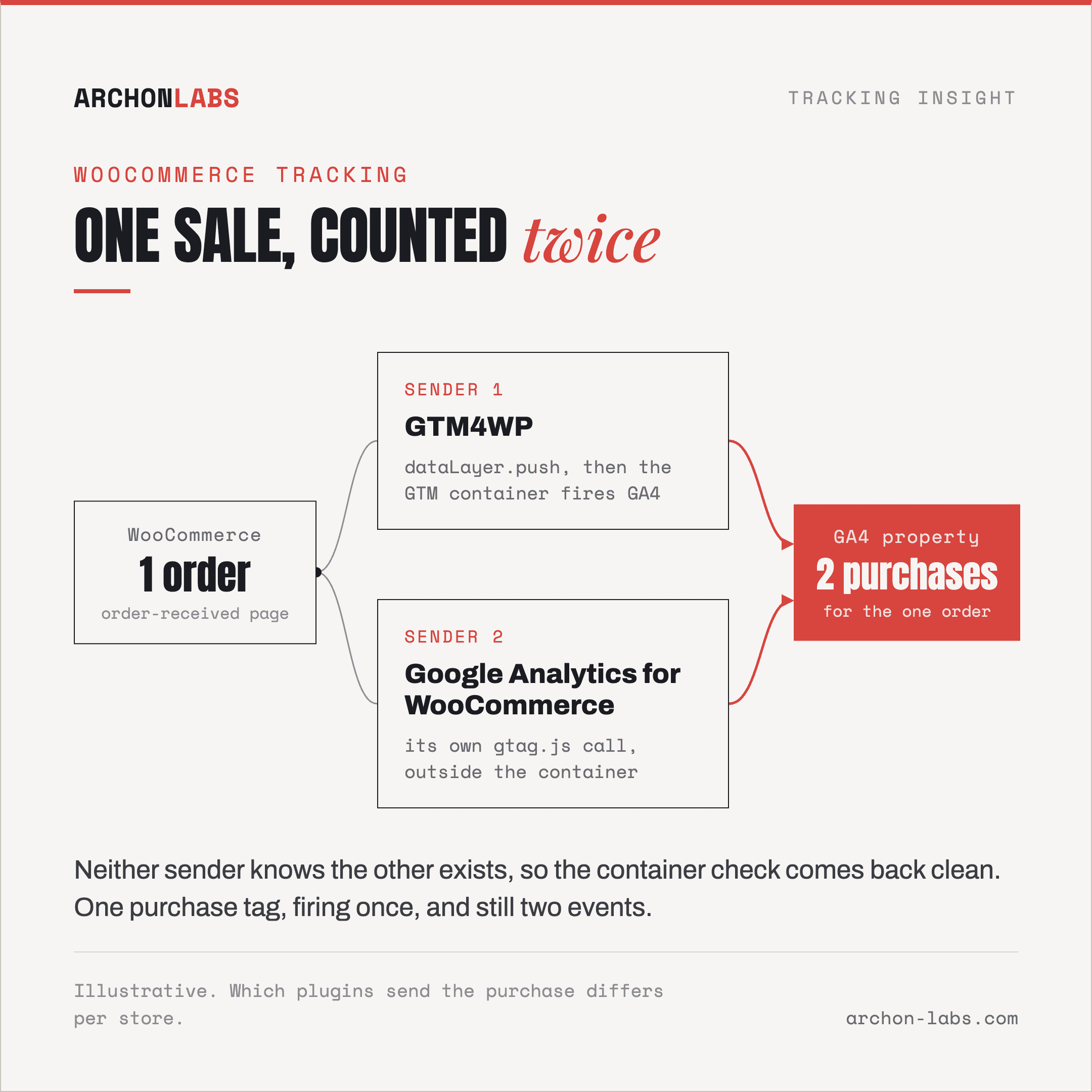
WooCommerce does not build a data layer by itself. Out of the box, the order confirmation page is a page like any other, with no dataLayer.push() describing what was purchased. Something has to add that, and on a typical WordPress build there are two different kinds of something, and they do not know about each other.
The first kind is a bridge plugin built specifically to feed Google Tag Manager. GTM4WP, one of the most installed options for this, hooks into WooCommerce's own actions and pushes structured events, product views, add to cart, and a purchase event keyed to the order-received page. Its own documentation describes the purchase event firing on the woocommerce_thankyou action, with a fallback it calls “reliable purchase tracking” that defers the event to the customer's next page view, using a cookie, a localStorage entry and a flag stored on the order itself, specifically so the same order is never pushed twice even if the visitor reloads the confirmation page or comes back to it later, according to GTM4WP's own documentation. That de-duplication effort exists because the plugin's authors have seen how often this exact page gets loaded more than once for the same order.
The second kind skips Google Tag Manager and sends straight to Google Analytics. The official Google Analytics for WooCommerce plugin fires its own gtag.js call for the purchase, independent of anything running inside a Google Tag Manager container. Its own listing is direct about the risk: the FAQ instructs store owners to remove any other Google Analytics plugins or code from the site to avoid duplication and conflicts in tracking. That line exists because a store running this plugin's bundled sender alongside a Google Tag Manager container also configured to fire a GA4 purchase event has exactly that setup, two independent paths reporting one sale.
An inherited store often has both, not because anyone deliberately doubled up, but because tracking on WooCommerce sites tends to accumulate rather than get designed. A developer installs a bridge plugin for Google Ads. A theme or another marketing plugin arrives with its own bundled analytics integration turned on by default. Each addition worked when it was tested in isolation.
Caching adds a third path to the same outcome, one that needs no second plugin at all. WooCommerce's own developer documentation names the Cart, Checkout and My Account pages as ones that must never be served from a full-page cache, because they display information specific to the current customer and their cart. The order-received page is not named explicitly in that guidance, and it carries exactly the same problem: it is a customer-specific page, built for one order. If a caching layer serves that rendered HTML, including a data layer push with that order's transaction ID baked into the markup, to a second visitor, the purchase event fires again on a browser that made no purchase. This is precisely the failure mode GTM4WP's own documentation addresses with what it calls a “cache-safe data layer” mode, built because full-page caches, its readme names LiteSpeed, WP Rocket, Varnish and Cloudflare APO by name, can do exactly this.
A newer wrinkle sits alongside both of these. WooCommerce's block-based Checkout does not submit an order the way the classic shortcode checkout does. Per WooCommerce's own developer documentation, the block checkout calls the Store API's checkout endpoint asynchronously, and the browser only navigates to the order confirmation page once the checkout process reaches a “complete” status and a redirect URL is returned. That is a genuinely different request and render mechanism than a classic full-page form submission. Whether a given theme's confirmation template still fires every hook a bridge plugin expects is not something WooCommerce's documentation states outright, so the honest position is not “it still works” or “it breaks”, it is that the underlying mechanism changed and a store that switches checkout templates needs its tracking retested rather than assumed unchanged, the same discipline as any other checkout or website migration.
All three paths share a ceiling worth naming honestly. Even a correctly configured, single-sender setup is a browser-executed pixel underneath, and browser-executed pixels lose 30-40% of their events to ad blockers and other browser restrictions before they ever fire. Fixing a double count gets the reported number back down to reality. It does not get it back up to what the store actually sold.
What good looks like
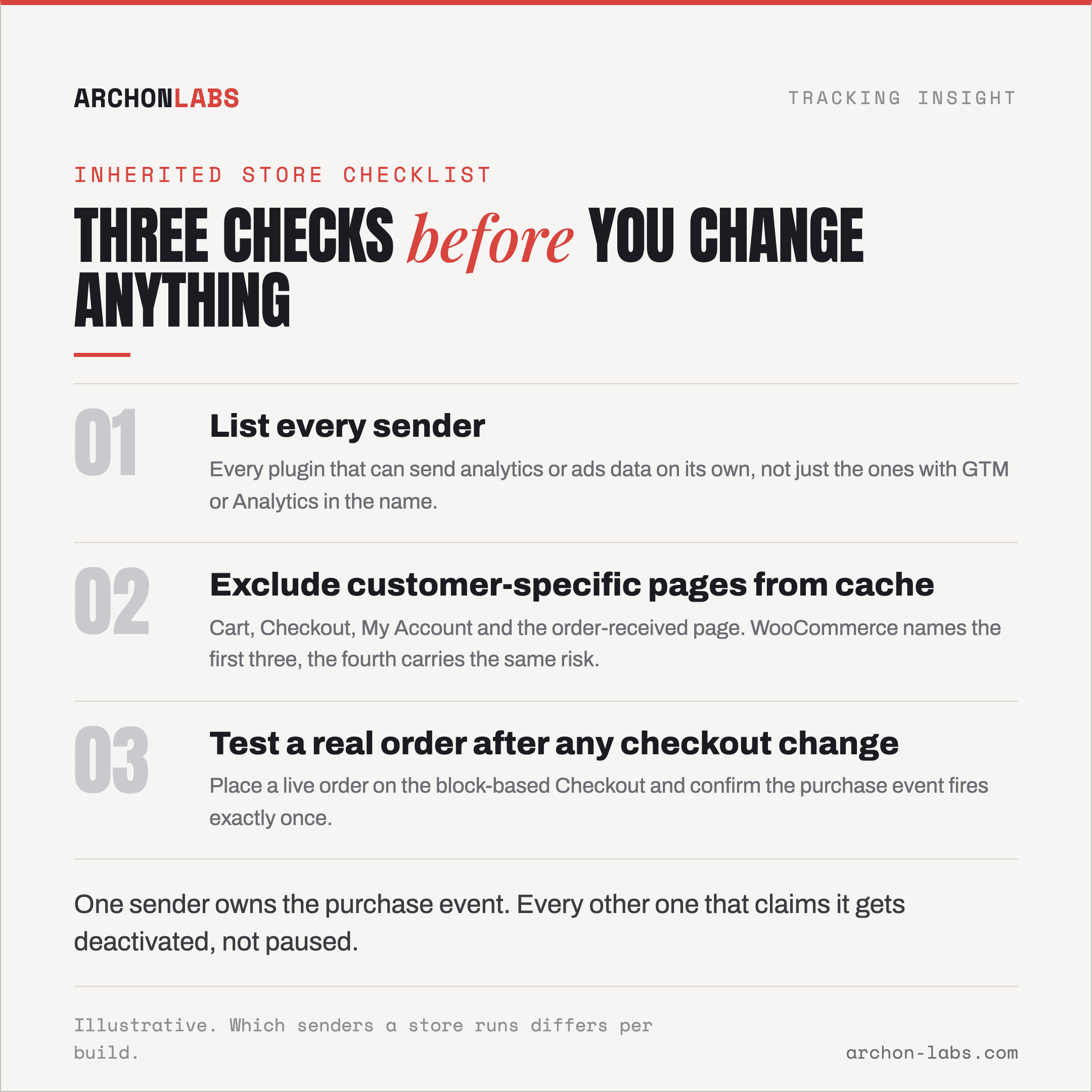
The fix is not a better plugin, it is deciding which single path owns the purchase event and removing every other one that also claims it. Walk an inherited store through three checks before touching anything else. First, list every plugin capable of sending analytics or ads data on its own, not just the ones with GTM or Analytics in the name, since a marketing suite or theme can bundle this quietly. Second, exclude the Cart, Checkout, My Account and order-received pages from any full-page cache, not just the three WooCommerce names explicitly, since the fourth carries the same customer-specific risk. Third, if the store runs or is moving to the block-based Checkout, place a real test order and confirm the purchase event still fires exactly once, rather than assuming a working classic-checkout setup carries over unchanged.
Where an inherited store has accumulated more senders than anyone can account for, that audit is the first thing to run, before a client ever asks why the numbers do not match. Archon Signal is built for exactly this: mapping every sender that touches a purchase event, deciding which one should own it, and configuring the rest so a sale gets counted once.
FAQ
We already run GTM4WP. Do we still need a separate Google Analytics plugin for WooCommerce?
No, and running both is the most direct route to a doubled purchase count. GTM4WP feeds Google Tag Manager, which then sends its own GA4 event. A separate bundled Analytics plugin sends its own GA4 event independently. Pick one path and deactivate the other, do not pause it.
How do we check whether a store is double sending without breaking anything?
Place a real test order and open the browser's network tab on the confirmation page. Two separate calls to Google's collect endpoint, or a dataLayer with the same transaction ID pushed twice, both point at the same problem. Comparing WooCommerce's own order count against GA4's reported transaction count over the same date range works too, without needing to touch the live site at all.
Does switching to the WooCommerce Checkout block break our existing GTM setup?
It depends on the theme and the confirmation template, and treating it as a safe, invisible upgrade is the mistake. The block checkout submits the order through a different, asynchronous mechanism than the classic checkout, so a plugin that assumed the old page-load timing needs a real test order placed against the new checkout before anyone trusts the numbers again.
Can a caching plugin really cause a duplicate purchase event with only one tracking plugin installed?
Yes, if the order-received page is served from a full-page cache. That page is customer-specific by design, and a cached copy shown to a second visitor can carry the first customer's data layer push along with it. Excluding Cart, Checkout, My Account and the order-received page from full-page caching removes this path entirely.
Should the fix move to server-side tracking instead of chasing plugin conflicts?
Moving execution server-side changes where a tag runs, it does not decide which sender owns the event. The same never-both rule applies either way, a server container replacing a client-side pixel still needs every duplicate client-side sender turned off, or the collision simply moves along with it.
If an inherited WooCommerce store is reporting numbers nobody can fully explain, request a free tracking audit and we will map out which sender should own each event.