The symptom
The new site went live on a Tuesday. It loads faster, the redirect map was signed off twice, and Search Console settles down after a nervous fortnight. By every measure agreed beforehand, the migration went well.
Then the numbers start arguing. Google Ads reports fewer conversions than last month while the client's order count says otherwise. Returning visitors have nearly disappeared in GA4 and direct traffic has grown by about the same amount. Half the landing page report shows old paths with history and no traffic, the other half new paths with traffic and no history. One form still records a conversion, another stopped, and nobody can name the day.
Then the client asks the reasonable question: is the new site performing better or worse than the old one? Four weeks in, you cannot honestly tell, which is a worse conversation than a drop.
Why it happens
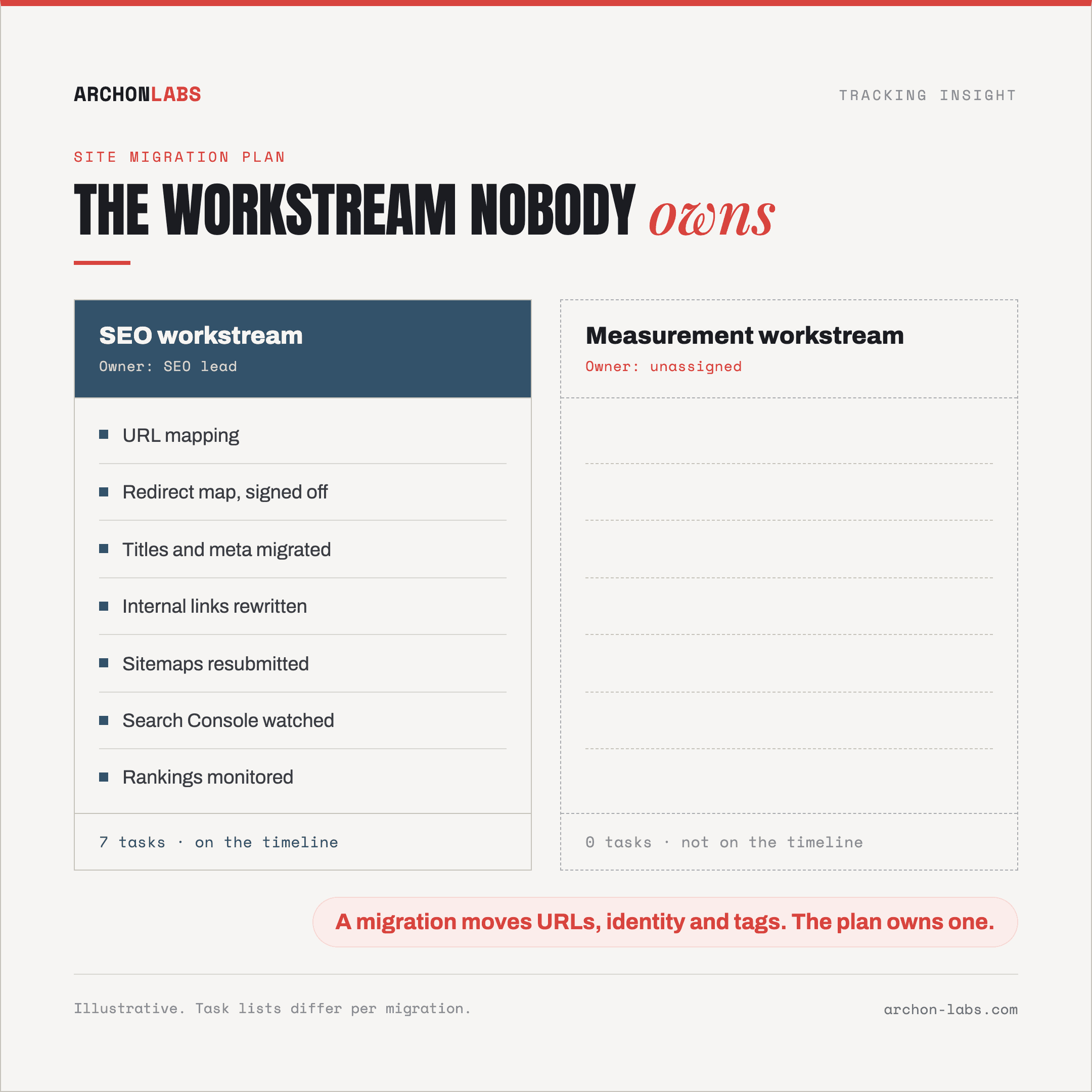
A migration is not one change. It moves three things at once: the addresses pages live at, the identity of the people visiting them, and the environment your tags run in. The plan owns the first, on behalf of search, and in most plans nothing owns the other two. A migration is also announced weeks ahead, so unlike a routine release, all of this is preventable.
The redirect map is written for Google, not for your tags
Google's site-move guidance is about search signals. Google Search Central recommends "HTTP permanent redirects if possible, such as 301 and 308" and says to keep them "for as long as possible, generally at least 1 year". Follow it and rankings transfer.
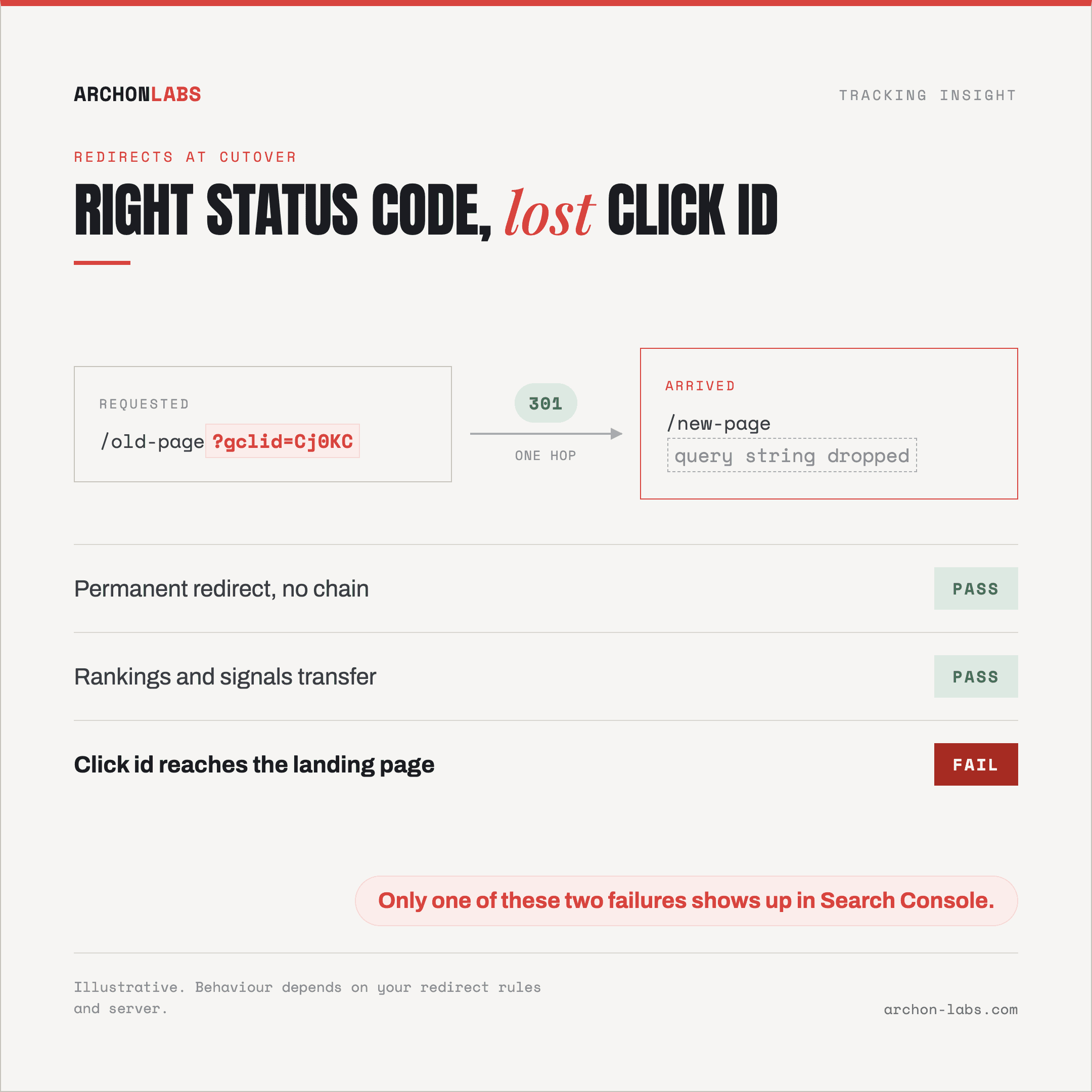
Your measurement needs a second thing from the same redirect, documented somewhere else entirely. Auto-tagging appends a click identifier to the landing page URL, and Google Ads Help states that "if your website uses redirects, it's also important to make sure the GCLID is passed to the final landing page in order to track conversions". Whether a redirect carries the query string is a separate property from whether it returns the right status code. So a redirect can be correct for search and still arrive without the parameter that makes the click attributable, and only one of those two failures shows up in Search Console.
Identity restarts when the address changes
Cookies are scoped to a host. Per MDN, a cookie's Domain attribute means "only the current domain can be set as the value, or a domain of a higher order", and when omitted the cookie "is returned only to the host that sent them". So the analytics cookie on the old host cannot be handed to the new one. A returning customer arrives as a new visitor and gets today's traffic source instead of the one that originally won them.
If the migration splits the site across hosts, a marketing site on one domain and a checkout flow on another, the problem doubles. Google Analytics Help is explicit that without cross-domain measurement configured, "new cookies with new IDs are created for each domain a user visits". Your old domain will also show up as a traffic source until it is excluded.
The comparison the client will ask for has to be built in advance
Every migration checklist ends with the same line: compare against your pre-migration benchmarks. That is advice you can only take if somebody wrote the benchmark down first.
Two documented limits decide what stays possible. On a standard GA4 property, data retention for event-level and user-level data is 2 or 14 months, and the setting does not affect "standard aggregated reports (including primary and secondary dimensions)" but does affect "explorations and funnel reports". The headline comparison survives, the funnel you would use to find out which step got worse has a horizon. The other limit is the URL structure, which splits any page-level report at the cutover: old paths hold the history, new paths hold the traffic.
The cutover window is a blind spot of its own
For a week or two around go-live, staging and production are both alive and test traffic tends to land in the real property. GA4 data filters are the tool for that, and they are strictly forward-looking: "once you apply a data filter, the effect on the data is permanent", and a filter "can take between 24 - 36 hours to apply". Prepared beforehand, that is hygiene. Applied in a panic on launch day, it is an irreversible decision about data nobody has looked at yet.
Attribution straddles the switch too. The default conversion window for website conversion actions is 30 days and can run to 60 or 90, so clicks from the old site keep converting on the new one and reporting against pre-migration campaigns. And the baseline being blended was never whole: around 15-30% of conversions are consistently uncaptured before anyone touches the site, for the reasons in why conversions never reach GA4, so a migration-sized loss has noise to hide inside.
What good looks like
Measurement becomes its own workstream, with a named owner and a place on the same timeline as the redirect map. Four things sit on it.
Take the baseline before, not after. Export what you will be asked to compare against and keep it outside the property: conversions and revenue per channel, per campaign and per key template, plus the funnel steps you report on. Alongside it, an inventory of what currently fires and where it goes, the ground a tracking audit covers.
Get the dependencies into the build brief. Which URLs carry conversions, which events must exist under which names, what the data layer has to expose, how consent is loaded, and whether the redirects preserve query strings. Each of those is free while the build is open and a change request afterwards.
Verify on day one against that list, item by item, rather than by clicking around the new site, which only tests the journeys you happen to think of.
Then keep watching for weeks. Google notes that search visibility fluctuates while a move settles, and the conversion window keeps paid reporting blended for up to a month, so a clean launch day proves little. This is where Archon Alert earns its place: it learns what normal looks like per client and per metric, so a break that opens in week three reaches you as an alert rather than a client question in week six.
The stakes scale with how good the setup was. In the performance agency case, recovering the 38% of client traffic affected by tracking prevention produced a 26% average uplift in measured conversions and saved 14 hours per project. A migration can hand that ground back in an afternoon while the dashboards keep rendering.
The ceiling is worth stating plainly: a migration cannot be made lossless. A domain change resets returning-visitor identity by design, so the realistic goal is to know what changed, what it cost, and which part of the difference is the new site rather than the measurement of it.
FAQ
Should we keep the existing GA4 property or start a new one?
Keep it, unless the business behind the site is genuinely different. A new property restarts your history and your retention horizon, with no way to stitch the two together later. One property with a documented discontinuity is easier to explain than two with a gap between them.
The domain is changing. What can we not save?
Returning-visitor identity, and anything stored in a cookie on the old host. That includes the cookie lifetime you were relying on: a properly set first-party cookie can last up to 400 days rather than the 1-7 days a browser allows a third-party script, but on the new host that clock starts at zero.
How long should we watch after launch?
Weeks, not days. Search visibility takes weeks to settle per Google's guidance, and the default 30-day conversion window keeps paid reporting blended for about a month. Watch for a metric that quietly settles below its old normal and stays there, not only for launch-day zero.
We go live in two weeks. What is the minimum?
Export the baseline, list the conversion URLs and events that must survive, confirm the redirects carry query strings, and put a name against day-one verification. If only one of those happens, make it the baseline export, because it is the only item that becomes impossible after the cutover rather than merely expensive.
If a client migration is on your calendar this quarter, a free tracking audit gives you the baseline and the dependency list before the build closes, which is the cheapest moment to have them.