The symptom
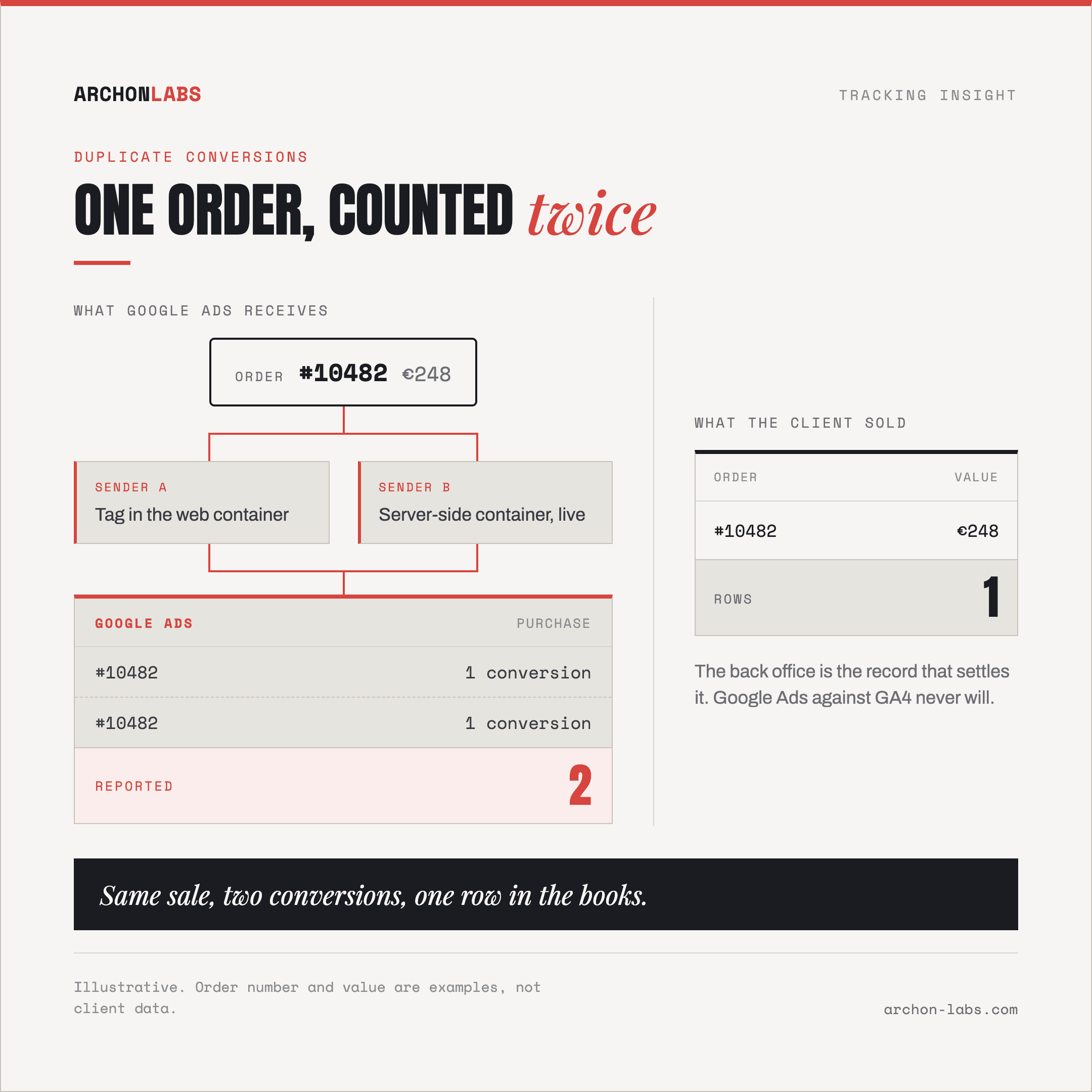
Google Ads reports more conversions than the client has orders. Not the familiar argument with GA4, but more purchases than the shop's back office recorded, or more leads than there are rows in the CRM.
Everything downstream reads better than the business is performing. CPA falls, ROAS climbs, the marginal campaign is suddenly the one to scale, and the monthly report says so because the agency put it there. Then someone compares the channel to revenue and the meeting changes tone.
Nothing broke on the day it started. Duplicate conversions are usually the residue of a change that was correct in itself: a server-side migration, a second tag manager, an Analytics import switched on by somebody being helpful.
Why it happens
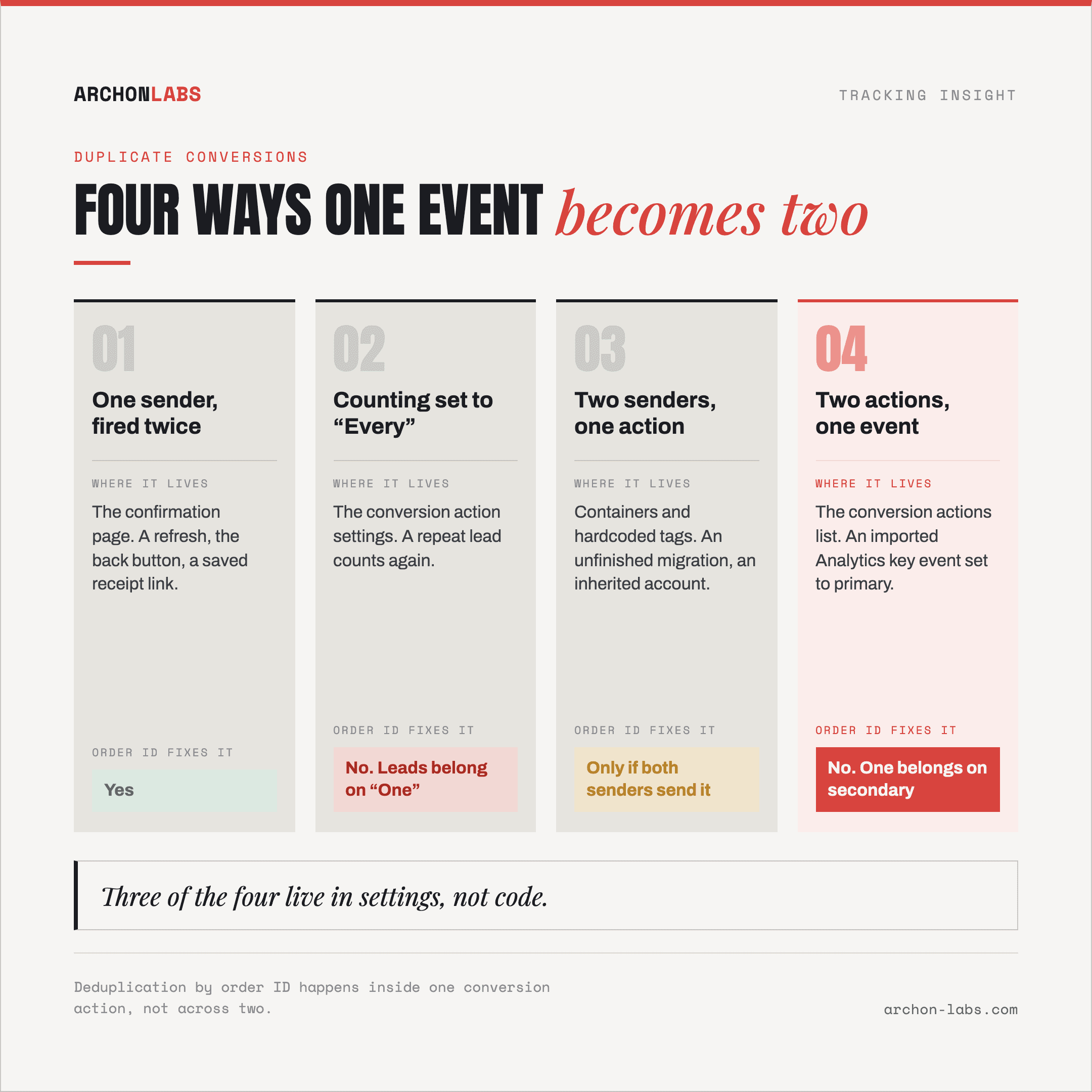
There are four ways one event becomes two conversions in a Google Ads account. Separating them is most of the work, because the fix differs for each and three of the four live in settings rather than code.
One sender, fired twice
The common one, and Google documents it. From the Google Ads Help page on transaction IDs: "if a customer returns to the conversion page or reloads the page, it's possible that the same tag could fire again, and a second conversion could be counted for the same order".
Anything that brings a customer back to the confirmation page does it. A refresh, the back button, a saved link to the receipt. The visit is real, the order is not new, and the tag cannot tell the difference.
Google's answer is a transaction ID, the order number carried with the conversion, so that "if there are 2 conversions for the same conversion action with the same transaction ID, Google Ads will know the second conversion is a duplicate". Note the qualifier, it matters later: the match happens inside one conversion action. Google does not publish how far back it compares those IDs either, so treat an order number as needing to be unique for the life of the account, not for the month.
The counting setting was told to do it
Each conversion action carries a counting option that decides whether a repeat event can be a duplicate at all. Google's conversion counting documentation describes the two: "Every" counts each conversion that follows an ad interaction, while with "One", "Google Ads counts only one conversion per ad click".
Google recommends "Every" for sales, because "every sale likely adds value for your business", and "One" for leads, because "usually only one, unique lead per ad click likely adds value for your business". A lead action left on "Every" counts the same person requesting the same quote twice in a week.
The trade-off is why this is not a universal fix. "One" removes the duplicate, and the genuine second purchase from the same click with it, which is why ecommerce accounts need order IDs and most lead generation accounts do not.
Two senders, one event
Two tags can target the same conversion action, and the platform receives two conversions that look independent. The usual source is an unfinished migration. Google's server-side tagging documentation ends its setup with the step people skip: "Once your Google Ads Conversion Tracking tag works as intended, you can remove any equivalent Ads Conversion Tracking tags in a web container to avoid data duplication."
Inherited accounts have the same shape. A hardcoded tag from the previous agency beside a container tag from this one, or two containers because nobody removed the old one. Google's cross-account conversion tracking documentation lists fewer tags as a benefit in itself, "placing fewer tags on your site makes it less likely to accidentally count the same conversion more than once", and draws a hard line for agencies on a manager account: an account "can use account-specific conversions or cross-account conversions. It can't use both."
Two conversion actions, one event
This is the one transaction IDs will not save you from. When a purchase is measured by the Google Ads tag and by an imported Analytics key event, the account holds two conversion actions for one sale.
Google defaults its way out of that. Actions built from Analytics "are set to 'secondary' conversion actions to prevent counting the same event twice for bidding", per the Google Ads Help page on Analytics-based conversions, and secondary actions "are for observation only", kept out of the "Conversions" column, per the documentation on primary and secondary actions.
The protection holds until somebody sets the imported action to primary, which is what happens when a client wants the Analytics number in the main column. Analytics Help states the rule plainly: "make sure to only use one conversion as your primary goal, to prevent double counting the same conversion in your campaigns." A shared order ID does not rescue this case, because the deduplication Google documents happens inside a conversion action, and here there are two.
Inflation and loss run at the same time
The trap is assuming an account has one problem or the other. A standard browser-side setup consistently fails to capture 15-30% of conversions, and nothing above stops that happening in the same month, so an account can count purchases twice while dropping consent-denied ones, the errors partly cancelling in the headline number. A total that looks about right proves nothing.
Which is also why Google Ads against GA4 is the wrong instrument, since those two disagree for counting-rule reasons even when both are healthy. The comparison that means something is the client's own record of what was sold, and the same applies to leads measured against the CRM.
What good looks like
One sender per conversion action, so the web container copy is gone rather than paused once server-side is live, and a conversion owned by the manager account is not owned by the client account too. One primary action per outcome, so the "Conversions" column describes one sale once. A counting option chosen for the type of conversion. An order identifier on each purchase, so there is something to deduplicate on when a confirmation page is reloaded.
This is the work Archon Signal is built for. Conversions leave from one place, server-side, with the order identifier attached, so the platform can recognise a repeat and the agency has one sender to check rather than a collection of tags nobody owns. It makes the number truer, not complete: consent refusals, ad blockers and browser restrictions keep removing events regardless, and the realistic ceiling on what any setup collects is around 95%, a ceiling rather than a promise.
Then a habit rather than a project: once a month, reported conversions against the client's own record of orders or signed leads. Not to make them match, they will not, but to know the size and direction of the gap, so a change in it is visible. Whether that gap is worth acting on depends on how big it is, and on whether Smart Bidding runs on the action, because a duplicated conversion is training it. Small and stable is a footnote. Large, or quietly growing, is budget allocated on a number that is not true.
FAQ
Does Google Ads not remove duplicates by itself?
Partly, and the limits matter. It deduplicates conversions carrying the same transaction ID within one conversion action, and it sets Analytics-derived actions to secondary by default. Neither protection covers two primary conversion actions describing one sale, and neither helps a purchase sent without an order identifier.
Can we set counting to "One" and be finished?
For lead generation, usually yes, and that is Google's own recommendation. For ecommerce, no: one conversion per ad click also discards the genuine second order from the same click, trading an overcount for an undercount. Sales actions stay on "Every" and get order IDs instead.
We import conversions from Analytics and also run the Google Ads tag. Are we double counting?
Only if both are primary. Check which conversion actions feed the "Conversions" column, and if a purchase reaches it from two actions, one belongs on secondary. A two minute check, and one of the most common faults in inherited accounts.
Fixing this will make our reported performance look worse. How do we handle the client?
Raise it before you fix it, not after. Explain that the reported CPA has been flattered by a counting fault, show the gap against the client's own order data, and agree the corrected baseline in advance. Handled that way it is a credibility gain. Found later by the client's finance team, it is not.
If you are not sure which of the four is happening in a client account, that is what the free tracking audit is for: one account, checked against what the client actually sold.