The symptom
Most agencies end up with one of two monitoring setups, and they fail in opposite directions.
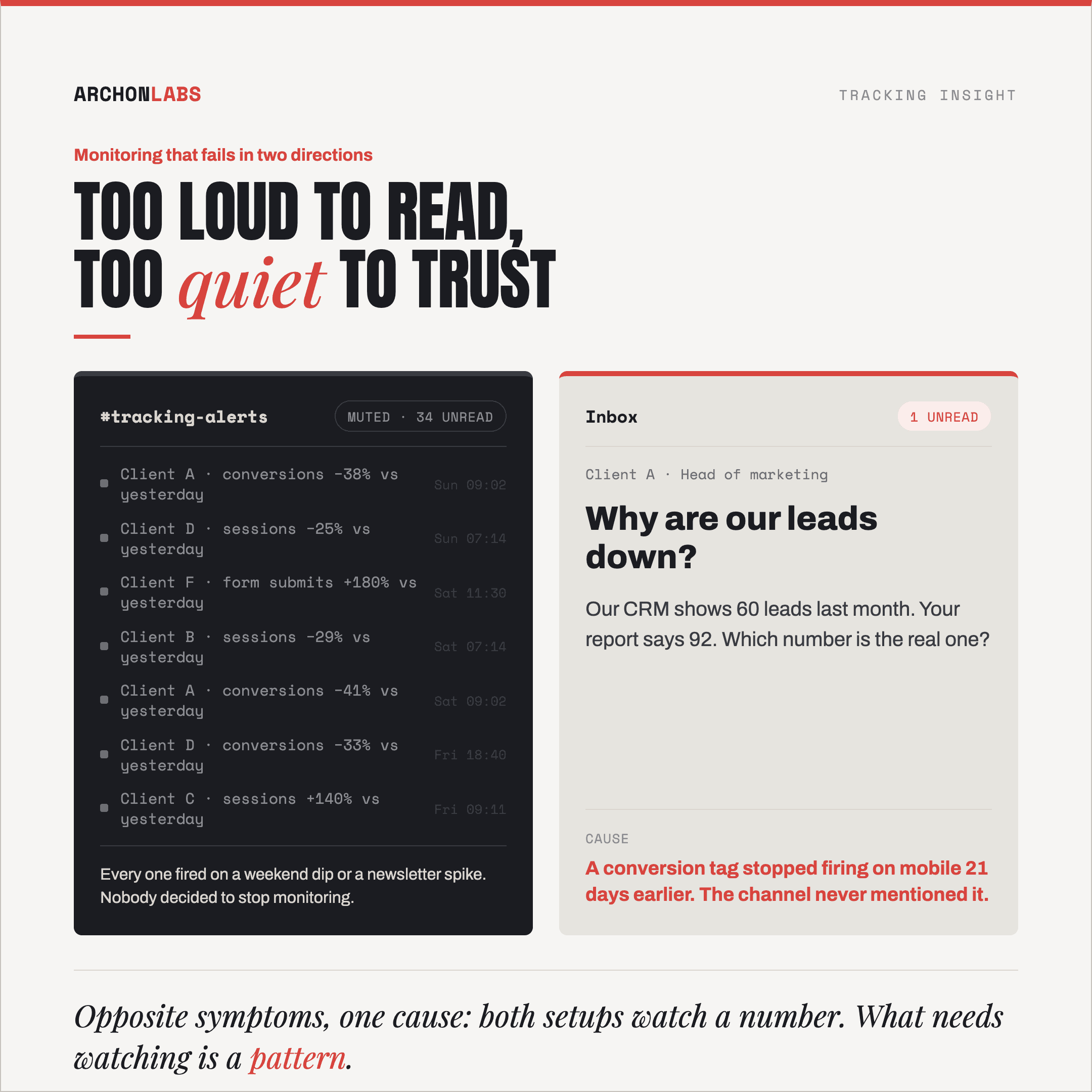
The first is loud. Alerts fire on quiet Mondays, on the day after a promotion ends, and on any client whose traffic doubles when their newsletter goes out. After a few weeks somebody mutes the channel. Nobody decided to stop monitoring, it just became rational to ignore it.
The second is quiet. The setup has not complained in months and the team reads that as good news. Then a client asks why the lead volume in their CRM looks nothing like the monthly report, and the cause is a conversion tag that stopped firing on mobile three weeks earlier.
They look like opposite problems and they have one cause. What is being watched is a number. What needs watching is a pattern.
Why it happens
Three failures produce this. The first is why the channel gets loud, the other two are why it is useless once it goes quiet.
A threshold is a fixed guess about a metric that never sits still
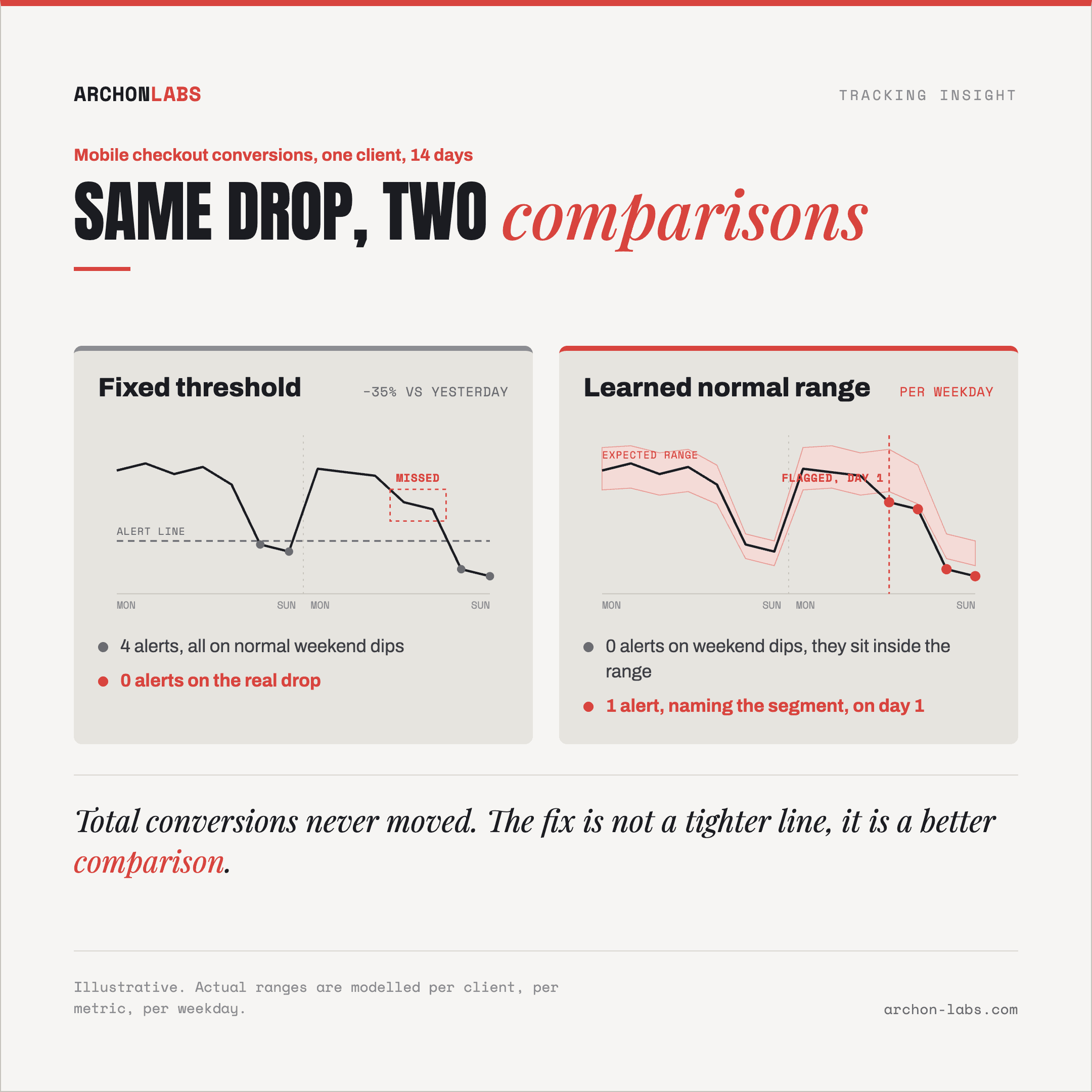
Conversions per day is not a stable number. It moves with the weekday, with campaign flights, with the season. Set an alert to fire when the number drops by a fixed percentage against yesterday, and you have compared a moving metric to a line that does not move.
The advice in almost every GA4 alerting guide is to change the line: raise it on false positives, lower it when you miss something. That never converges, because one number has to be tight enough to catch a real break on a large account and loose enough to stay quiet on a slow Sunday for a small one. It cannot be both, so it ends up being neither.
Site reliability practice settled this years ago. In Google's Site Reliability Engineering book, the rules are that "every page should be actionable" and that pages "should be about a novel problem or an event that hasn't been seen before". An alert that fires every Sunday fails both tests. It is not a signal, it is a calendar.
Real breaks hide inside a segment, or arrive gradually
Tracking rarely breaks in a way the total shows. It breaks for one browser, one device type, one of six conversion actions, one funnel step. Meanwhile paid search had a good week, the total holds, and an alert watching the total sees nothing.
Monitoring per segment is the obvious answer, and it is where thresholds collapse under their own weight. Every segment needs its own line, and every line needs maintaining as the account changes. Nobody keeps that up by hand across a portfolio, so the alerts stay on the totals.
Gradual failures get through differently. A consent default that changes, a cookie that starts expiring sooner, a tag that misfires on slow connections: the loss ramps up over weeks. Each day stays inside the threshold, the cumulative shortfall is large, and no single day ever trips the alert.
Nothing can alert on data that never arrived
The third failure has two halves.
The first half is absence. When a tag stops firing there is no metric moving the wrong way, there is no series at all. An alert defined as a condition over incoming data has nothing to test.
GA4's own detection is better than a fixed threshold, and it still has agency-shaped limits. Per Google Analytics Help, Analytics "applies a Bayesian state-space time series model to the historic data" and flags a datapoint that falls outside the model's credible interval. That is real statistics and it accounts for weekday and seasonal patterns. Two limits matter. It evaluates on a frequency you choose, hourly through monthly, so a break can sit a full cycle before anything looks at it. And the training window is fixed, "for detection of daily anomalies, the training period is 90 days", so a partial failure running longer than its window becomes part of the baseline. Once the model has learned the degraded level as normal, it stops calling it an anomaly.
The second half is the baseline. On a typical account 15 to 30% of conversions are never captured, for reasons we took apart in why conversions never reach GA4. Monitoring on top of that watches changes in the part you do capture, which is worth having and is not the same as knowing the data is right.
Platform hints exist and they are passive. Google Ads marks a conversion action "Awaiting conversions" when, per Google Ads Help, "no conversions have been recorded in the last 7 days". That is useful information sitting in an interface, waiting for somebody to open the right tab, and by then a week of bidding has run on a signal that was not arriving.
What good looks like
None of the fixes is a tighter number. All of them change what the incoming data gets compared against.
Learn the normal range per metric per client, instead of setting a line. Statistical detection models what a metric normally does on this account, on this weekday, at this time of year, then flags what falls outside it. That is the difference between "lower than yesterday" and "lower than this account has ever been on a Tuesday in July".
Treat absence as its own event, and compare independent sources. A check for "this tag has sent nothing for longer than it has ever been quiet" catches the failure class no threshold can see. And the same conversion counted in two independent places, the analytics property and the ad platform, diverges when one of them breaks. Divergence catches what neither count catches alone.
Alert on the segment, and route it to a human with context. The alert names which client, which metric, which segment, when the pattern changed and what else moved with it. That is the difference between something actionable and a notification, and it has to land where the team already works.
That combination is what Archon Alert does: statistical monitoring on traffic, conversions and funnel steps, per client, with alerts that carry enough context to act on.
One ordering rule matters more than the rest. Monitoring protects a setup, it does not repair one. Put alerting on an account that is already losing conversions and you will faithfully protect the loss, so establish what it really captures first. That first step is what a tracking audit covers.
For one performance agency, fixing the measurement layer brought 38% of affected client traffic back into measurement, lifted measured conversions by 26% on average, and saved 14 hours per project. Every one of those gains can decay quietly after a deploy, a tag edit or a consent change. Monitoring makes the decay visible in days instead of in a quarterly review.
Frequently asked
Is GA4 anomaly detection not enough on its own?
It is a real statistical model and it beats a fixed threshold, so use it. Two things limit it for an agency. It lives inside each property, so across a portfolio somebody still has to go and look. And it only knows the events GA4 received, the exact blind spot when the problem is that events stopped arriving.
We already get alerts from Looker Studio and the ad platforms, why add another layer?
Those watch performance: spend, CPA and ROAS moving the wrong way. This watches whether measurement is intact, a different question with a different answer. When a tag breaks both kinds eventually say something is wrong, and only one of them tells you what to fix.
Will statistical monitoring catch a slow decline?
Better than a threshold will, because the comparison is against a predicted range rather than against yesterday. A decline slow enough to be absorbed into the baseline is hard for any statistical method, which is why absence checks and cross-source comparison sit next to it rather than instead of it.
How many alerts should we actually be getting?
Few. If the setup is healthy most weeks are silent and every alert that fires gets read. Volume is the metric to watch on the monitoring itself. A channel somebody muted is not a monitoring setup, and a list trimmed down to keep it quiet is not one either.
Who fixes it when an alert fires, us or you?
Either. Most agencies want the diagnosis handled outside their team and the client conversation handled inside it, so the alert reaches us, we find the cause, and you decide what the client hears and when.
If you want to know what your current monitoring would catch across your client accounts, and more usefully what it would miss, request a free tracking audit.