The symptom
An agency takes over a Shopify store and the first task is working out what is actually tracking the site. There is a Google & YouTube app installed, a Google Tag Manager snippet buried somewhere in the pixel settings, and maybe a developer's custom script from two migrations ago that nobody remembers approving. Google Ads shows one purchase number, GA4 shows another, and the honest answer to "what fires the purchase event on this store" is: it depends which of four possible setups is still running.
The question that keeps coming up, what is the right way to add Google Tag Manager to a Shopify store, does not have one universal answer, because Shopify does not have one tracking system. It has four, overlapping, and Shopify and Google's own setup guides both warn about the failure mode an inherited store usually has: two of them firing on the same event.
Why it happens
Shopify has narrowed everything that touches tracking data down to one system. Pixels, of any kind, "run on your online store, customer accounts pages, or store checkout", and there is no supported way left to drop a tracking script straight into theme code instead. Inside that system there are two pixel types with different rules, plus the app Shopify and Google both point to as the default, plus the option of skipping the pixel system for the purchase event entirely.
The Google & YouTube app. Google's own setup guide calls this "the easiest way to set up conversion tracking" on Shopify: install it, link a Google Ads account, and purchase, add-to-cart and checkout-started map to conversion actions automatically. It needs no code and Google keeps it current as Shopify's own checkout changes. The same guide is also where Google warns agencies about the exact situation an inherited store tends to be in, telling them to check that they "don't have duplicate tags if you have conversions in the Google & YouTube app and in the storefront or custom pixel," and to remove legacy tags once the app is the source of truth.
An app pixel. A third-party marketing or analytics app installs its own pixel through the App Store. App pixels run in what Shopify calls a strict sandbox, and since December 10, 2025, Shopify enforces which customer fields that sandbox is allowed to see. Per Shopify's own changelog, a name, email, phone or address only reaches an app pixel once the app is approved for the matching protected-data scope, and every other field arrives as null, enforced "on all web pixel surfaces: storefront, checkout, and customer accounts." The same entry states plainly that "custom pixels are out of scope for this change," so a store can end up with two pixels sitting side by side with different visibility into the same customer.
A custom pixel. This is where a developer hand writes tracking, often Google Tag Manager loaded as a custom pixel rather than through an app. Shopify's own tutorial for that exact setup states plainly that "adding and using custom pixels is unsupported by Shopify," and that Google Tag Assistant's troubleshooting feature "isn't compatible with custom pixels, and doesn't detect any Google tags in a custom pixel." It runs in a more permissive, lax sandbox than an app pixel, which is exactly why agencies reach for it, and exactly why the store is on its own for debugging it.
Server-side. Instead of asking a browser-based pixel of any kind to be the thing that reports a purchase, the order event can come from Shopify's own backend instead, an order webhook fired the moment an order is placed, independent of whether the visitor's browser ran any pixel at all. That removes the sandbox entirely for the purchase event, but a webhook by itself only confirms an order happened, it does not know which ad click led there. That link still depends on a click identifier captured client-side earlier in the session and carried through to the order, which is what a properly configured server-side setup is actually for.
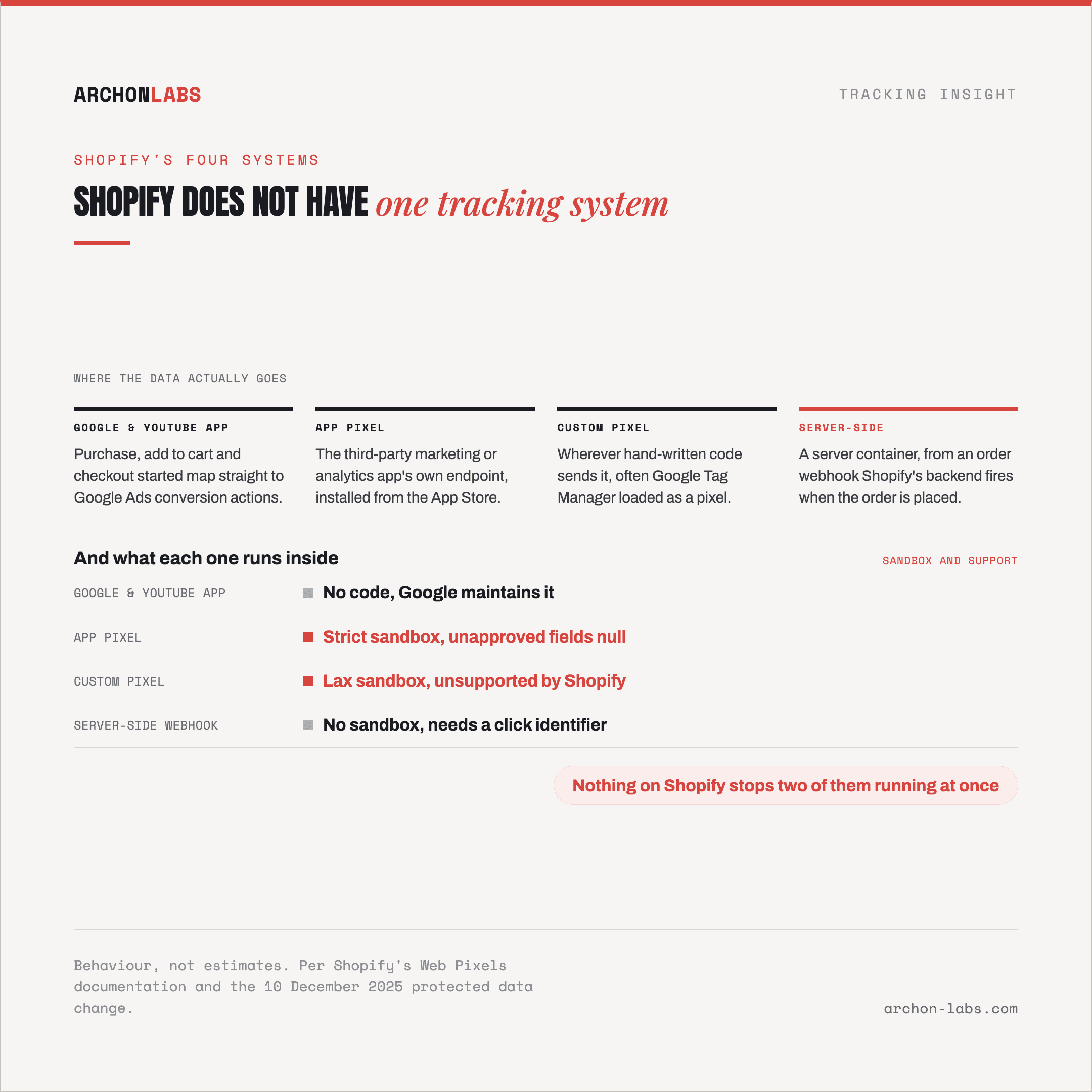
None of these four are mutually exclusive at the platform level, which is exactly the trap. Nothing stops a store from running the Google & YouTube app and a leftover custom pixel at once, both reporting the same purchase, the same two-senders-one-event problem that shows up wherever tracking methods get stacked instead of replaced. Every browser-based option here, app pixel and custom pixel included, also sits behind the same 30-40% of events ad blockers and browser restrictions strip out before Shopify's pixel logic runs at all.
What good looks like
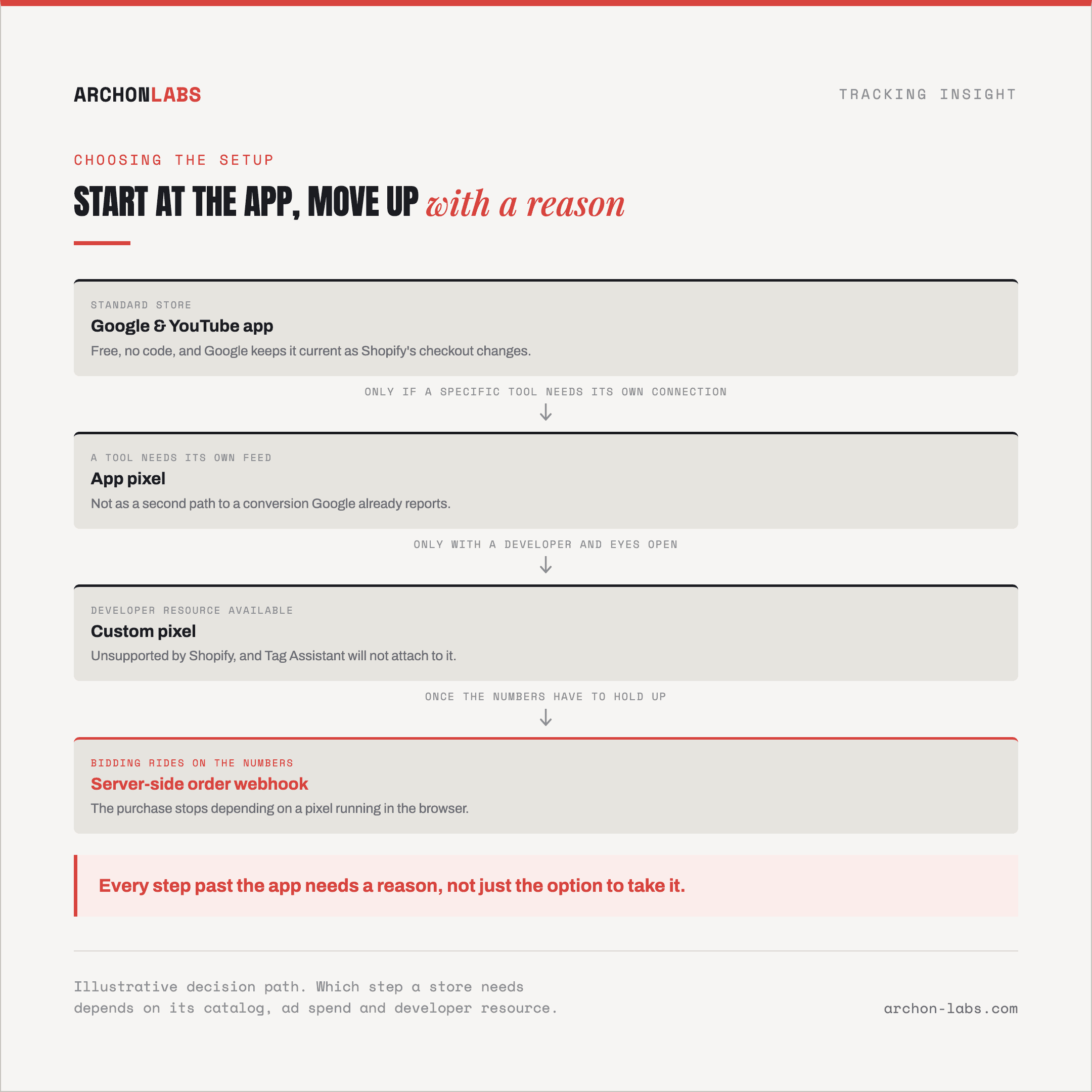
Start from the Google & YouTube app as the default for a standard Shopify store. It costs nothing to run, Google maintains it against Shopify's own changes, and for most catalogs it is enough. Add an app pixel only when a specific tool needs its own native connection, not as a second, redundant path to a conversion action Google already reports. Reach for a custom pixel only with eyes open that it is unsupported by Shopify and that the usual debugging tools will not attach to it, a real cost even where the flexibility is worth it.
Move to a server-side setup once the store needs the purchase event itself to stop depending on a browser-executed pixel, and needs the conversion value that reaches Google Ads and Meta to carry a real click identifier rather than an approximation. That still runs on a Google Tag Manager server container, and which host runs it matters far less than whether the domain and deduplication are set up correctly, covered in does the server-side tool actually matter. It also only pays off once that container's cookie runs on the store's own domain rather than a vendor default, the same 400-day-versus-seven-day gap that shows up across every server-side setup, Shopify or not.
Archon Signal is built for agencies in exactly this position, an inherited store running some mix of the four and a client asking why the numbers do not add up. We work out which of the four a specific store actually needs, remove the ones that do not earn their place, and configure the server-side piece properly rather than leaving a container running with nobody checking what it was set up to receive.
FAQ
Can the Google & YouTube app and a custom Google Tag Manager pixel run at the same time?
Technically yes, nothing on Shopify blocks it, and that is the problem. Google's own setup guide for the app warns agencies to check for duplicate tags between the app and any storefront or custom pixel, and to remove the legacy one once the app is live, precisely because both can fire on the same purchase.
Does the December 2025 protected-data change affect our numbers?
Only where tracking runs through an app pixel. Since December 10, 2025, Shopify sends a null value for any customer field, name, email, phone or address, that an app has not been approved to receive, across the storefront, checkout and customer account pages. Custom pixels sit outside that specific rule, so a store mixing pixel types can see one path losing fields the other still gets.
Do we need to remove old Additional Scripts or theme code first?
If tracking code is still sitting in theme files or old Additional Scripts, yes. Shopify's checkout no longer runs anything outside the Web Pixels system, so that code either already stopped firing or is quietly duplicating whatever the current pixel or app also sends.
Does moving the purchase event server-side fix ad blockers?
It removes the specific dependency on a pixel executing inside a sandbox in the visitor's browser, since the order webhook fires from Shopify's own backend regardless. It does not undo every source of loss. Consent refusals and network failures still apply, and the 30-40% of events ad blockers strip happens earlier, before checkout, so a purchase-only fix does not recover browsing or add-to-cart data lost upstream.
Which one should a small store pick versus an agency managing several client stores?
A single small store with modest ad spend usually stops at the Google & YouTube app and does not need more. An agency running paid media across several client stores, where one wrong conversion number changes a bidding decision, is the case a server-side setup is built for, and where a specialist tends to pay for itself faster than a second app would.
If an inherited Shopify store has some mix of these four running and nobody can say for certain which one the numbers actually come from, request a free tracking audit and we will map out exactly what is live and what to change.