The symptom
You put server-side tracking on the roadmap and someone stops it in one sentence. Usually the client's developer, sometimes your own tech lead: that will hurt our Core Web Vitals. The project stalls there, because nobody in the room can answer it with anything sturdier than a vendor blog post, and no agency wants to be the reason a client's site got slower.
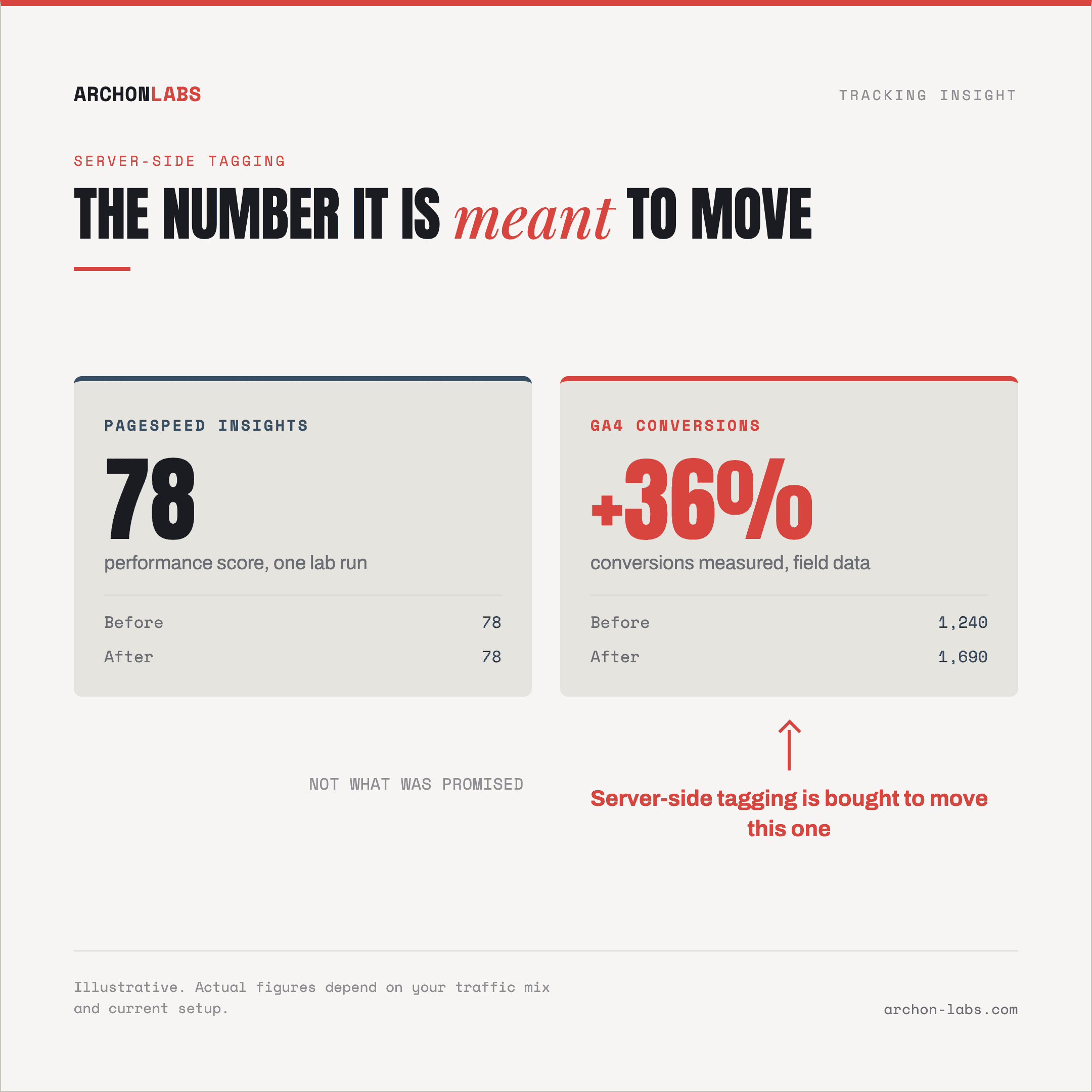
Or the opposite version. You already moved to a server container, someone ran PageSpeed Insights expecting a nicer number, and it looks the same as it did before. Now a setup that was bought to fix conversion data is being judged on a metric nobody promised, and the client is asking what they paid for.
Both conversations go badly for the same reason. The phrase server-side tagging sounds like the tracking left the browser, and by default that is not what happens. Until everyone agrees on what actually moves, page speed is an argument with no facts in it.
Why it happens
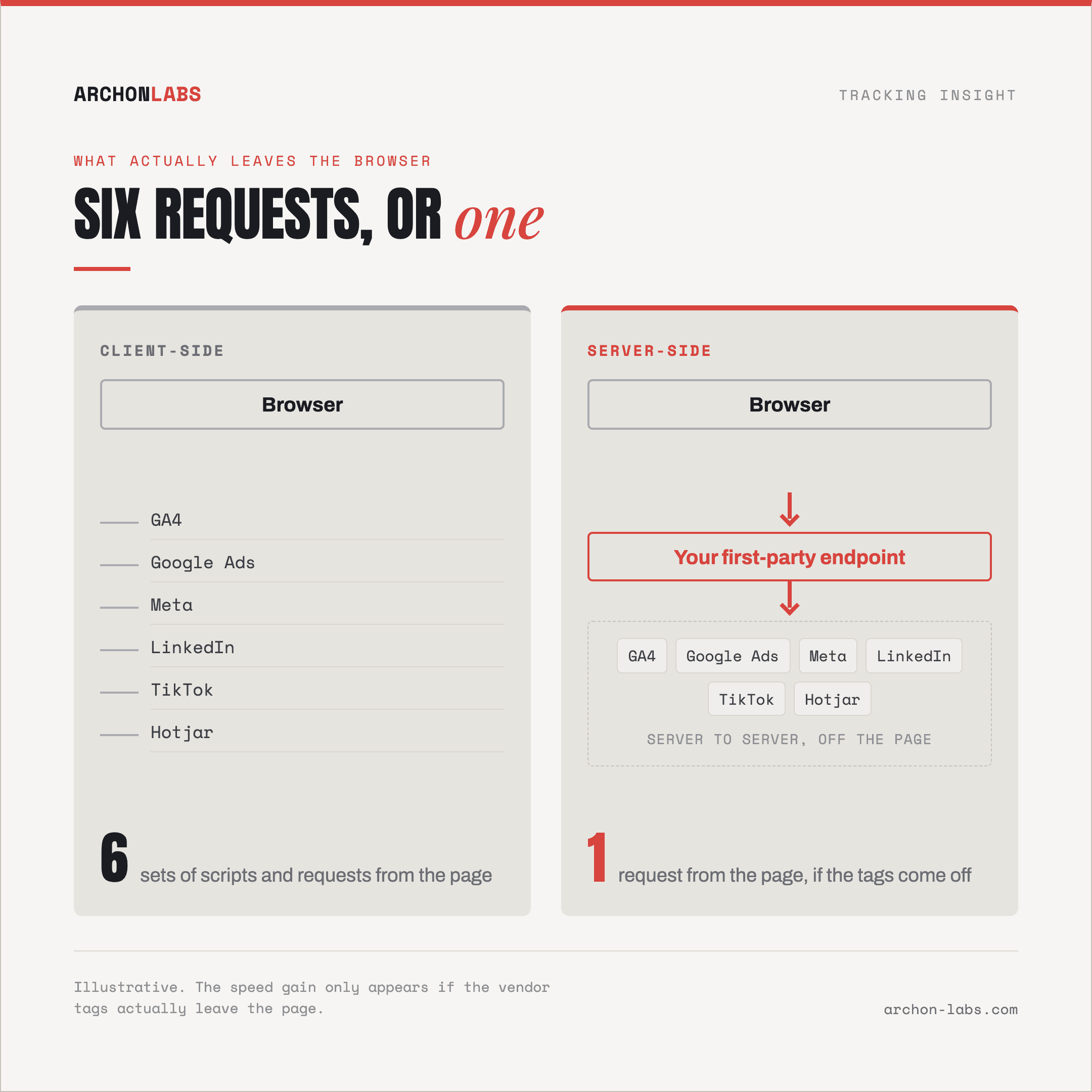
Start with what moves and what stays. Tag processing moves to a container you run. The page does not empty out. In Google's Tag Manager documentation, a web container still "resides on the website or app", and in a server-side setup "the client only has to generate one HTTP request per event that gets sent to the server container", after which the container generates and dispatches the vendor-specific requests. The browser is still doing measurement work. Less of it, but not none.
That same passage is where the real speed difference hides, and it pays to read it literally. Google's benefit is that "the client executes less code and dispatches fewer HTTP requests". In a client-side setup the browser has to map each event to one or more requests, depending on how many endpoints you send it to, so six vendor pixels mean six sets of scripts and six sets of requests. Route those through a container and the browser sends one. Real gain, and it only appears if the vendor tags actually come off the page.
Which is why so many server-side projects produce no speed change whatsoever. The container gets added, every client-side pixel stays exactly where it was, and the browser now does everything it did before plus one more request. Nothing broke. Nothing got faster either. Google's own introduction to server-side tagging is notably careful about this: it sells control over your data, not page speed, and the setup it describes still has a tag on the page sending events to your container.
The second confusion is latency, and there are two different kinds getting mixed together:
Latency that costs rendering time. This comes from third-party JavaScript on the page. web.dev puts it plainly: "too much JavaScript can block DOM construction, which delays page rendering", and its guidance is to keep third-party scripts out of the critical rendering path with async or defer. That is a property of how tags are loaded, not of where they are processed, and it is checkable on any site today.
Latency that costs events. Your server container is infrastructure someone has to size. Google's server-side setup guide recommends provisioning it as a cluster rather than a single server "for better availability, scalability, and performance", with at most 1 vCPU per instance. Under-provision it and requests queue or fail. That shows up as missing conversions, not as a slower paint.
Then there is what you are measuring. Core Web Vitals are Largest Contentful Paint within 2.5 seconds, Interaction to Next Paint within 200 milliseconds and Cumulative Layout Shift at 0.1 or below, and the assessment runs on field data from real visitors rather than on a single lab run. web.dev is direct about it: where you have both, field data is what you prioritise on, and a lab test cannot accurately measure Interaction to Next Paint at all, because it cannot predict when a real person will interact. So our PageSpeed score did not move and our Core Web Vitals got worse are two different statements, and only one of them is evidence.
What good looks like
Treat this as a measurement change with a performance side effect, not as a performance project. The reason to do it is signal. Around 15 to 30% of conversions go uncaptured in a typical account, ad blockers strip 30 to 40% of events before they ever leave the browser, and moving collection to your own origin is what earns a good share of that back. If the business case rests on a Lighthouse number, it is the wrong business case, and it will lose the argument in front of a developer who knows more about Lighthouse than you do.
Then decide tag by tag what actually leaves the browser, because that decision owns the speed outcome. Which vendors have a server-side path that carries the data they need, which have to keep something on the page, and what can be retired once the container is proven. An honest answer here is often "three of the six", and three is still three fewer sets of requests than the site sends today.
Sizing and hosting deserve the same directness. Where the container runs, how close it sits to the traffic, and how it scales at peak all decide whether events arrive, and the hosting choice matters less than the configuration, as long as someone owns the sizing rather than assuming a default will hold on a sale weekend.
This is the work Archon Signal does: collection moved to your own origin, tags loaded so they stay out of the critical rendering path, the container sized for real traffic, and 15 to 40% more conversions recovered against what the account measures today. The page-side footprint gets smaller rather than larger, which is the answer your client's developer is actually asking for.
Then prove it the way the objection was framed. Field data on the same page templates, before and after, over enough weeks to mean something. That turns a standoff about a hypothetical into a number both sides can read.
FAQ
Will our Core Web Vitals get worse after moving to server-side tagging?
Not from the container itself, because it runs off the page and adds no work to the browser's main thread. What changes the browser's workload is what you remove from the page and what you leave on it. The honest answer is that it depends on that choice, which is why the decision should be made per vendor tag before anyone signs off, not discovered afterwards.
Our PageSpeed Insights score did not improve. Was the project pointless?
Only if it was sold as a speed project. Server-side tagging is bought to recover conversion signal, and that shows up in conversions measured, not in a lab score. It is also worth knowing that Core Web Vitals are assessed on field data from real visitors, so a lab score standing still tells you very little either way.
Does any of this affect our SEO?
Core Web Vitals do feed Google's ranking systems, but Google Search Central is clear that "there is no single signal" for page experience and that a good score "doesn't guarantee that your pages will rank at the top of Google Search results". So a tagging change that keeps scripts out of the critical rendering path is good hygiene, not an SEO tactic, and treating it as one oversells it.
Can we delete the client-side pixels once the container is live?
Some page-side code always stays, since the browser is what sends the event to your container in the first place. Beyond that it is a per-platform question: it depends on whether that vendor's server-side integration can carry the data the platform needs, and on what breaks in the platform's own reporting if the browser tag goes. It is decidable, tag by tag, and it should be decided deliberately rather than left as an assumption in either direction.
If a developer has parked your server-side project on a page speed concern, a free tracking audit answers it for that specific site: what loads today, what could come off the page, and what the container has to be sized for.