The symptom
A Webflow-built landing page is running fine, leads are coming in, and then someone compares two numbers that should agree. Google Ads reports more form-fill conversions for the month than Webflow's own form submissions list shows, or GA4 shows what looks like two conversions for every one lead. Nobody changed the form recently, and whoever built the site insists nothing was touched.
The instinct is to check the obvious place first, a duplicated conversion action inside Google Ads, or two tags firing from the same Google Tag Manager container. That check often comes back clean, one conversion action, one tag. The duplicate is real, it is just not sitting where the obvious check looks, in how Webflow itself handles a form submission and in how many separate places are watching for that submission to count it.
This shape of problem is not unique to Webflow, the same two senders quietly claiming the same conversion shows up across plenty of platforms. Webflow's version has a specific cause, and it comes from a detail most tracking playbooks built for a classic HTML form never had to think about: a Webflow form does not reload the page.
Why it happens
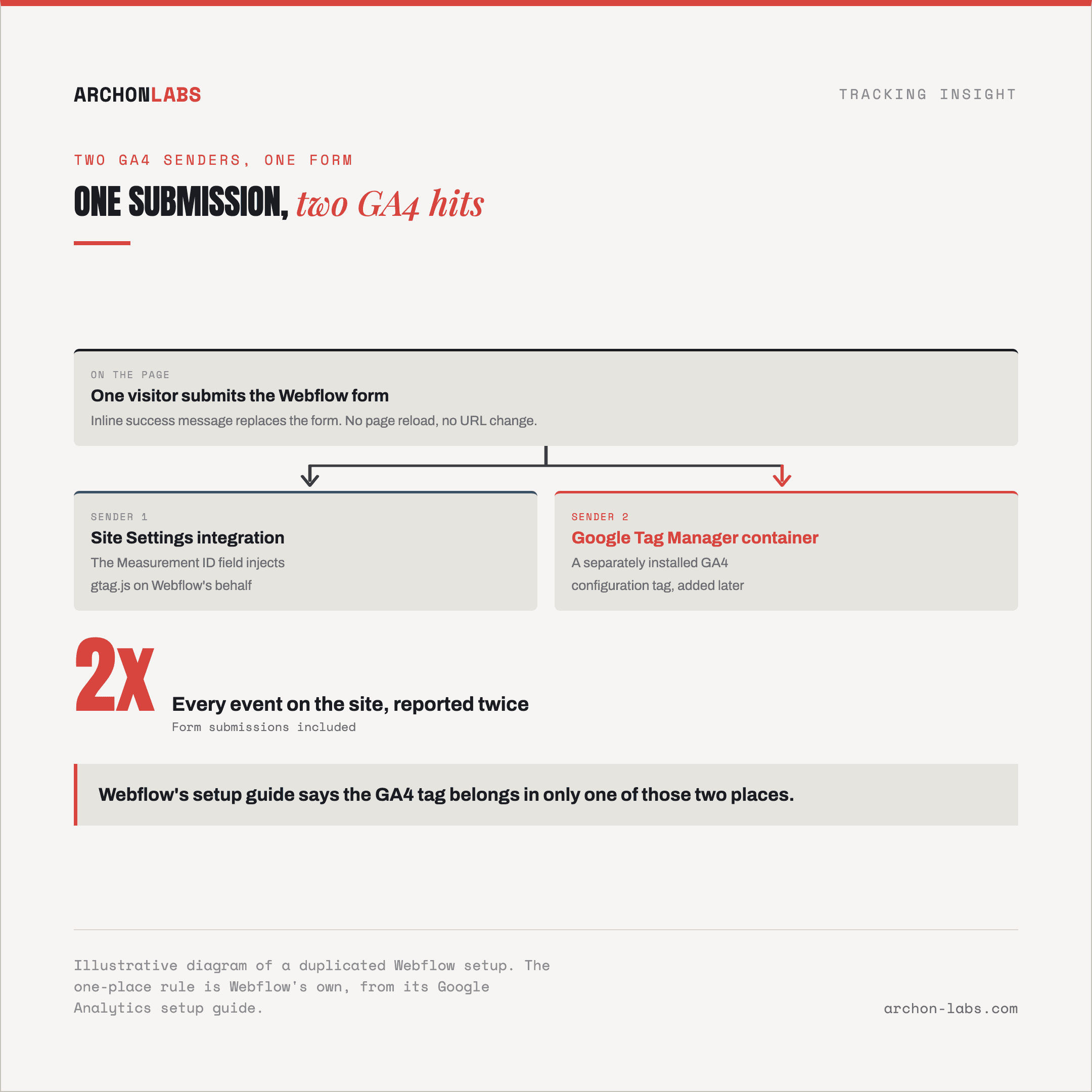
Webflow's own documentation describes the default outcome of a form submission plainly. A visitor sees an inline message in place of the form, “Thank you! Your submission has been received!”, or if something goes wrong, “Oops! Something went wrong while submitting the form.”, according to Webflow's Forms overview. Nothing navigates, the URL does not change, and there is no thank-you page unless the form is separately configured to redirect to one, an option the same documentation confirms exists: a form “can either choose a static page on your site or manually enter a URL” for visitors to land on after submitting.
That single detail, an inline success state by default with an optional redirect layered on top, feeds three separate points where one submission can end up counted twice.
The first is the plainest, and it is not specific to forms at all. Webflow's Site Settings carries its own native Google Analytics integration, a Measurement ID field that injects gtag.js on Webflow's behalf through what Webflow calls Google Tag Gateway. Webflow's own setup guide is direct about the risk of running that field alongside a separately installed script that also sends GA4 data, recommending the tag go “to only 1 of the following 2 places”, according to Webflow's Google Analytics setup guide. Where both stay live, a Site Settings integration and a Google Tag Manager container each holding a GA4 configuration tag, every event on the site reports twice, form submissions included.
The second cause survives even with only one GA4 tag on the page. GA4's enhanced measurement automatically collects a form_submit event on any standard form, described in Google's own documentation on enhanced measurement events as firing “when the user submits a form”, on by default alongside every other enhanced measurement event type, no code required. Separately, an agency wiring up a Webflow client's forms usually also builds a dedicated Google Tag Manager trigger for the same success state. That extra build step exists because Tag Manager's own built-in Form Submission trigger is designed around a form that leads to the browser loading a next page, its “Wait for Tags” setting exists specifically because “slow tags may not fire before the form submit causes the next page to load”, according to Google's Form submission trigger documentation. An inline success state with no next page loading does not match that assumption, so the practical workaround is a listener built directly against Webflow's own success state. That listener and GA4's automatic form_submit event are now two independent signals for the same submission, and if both get marked as a GA4 key event or imported into Google Ads as a conversion, one lead becomes two.
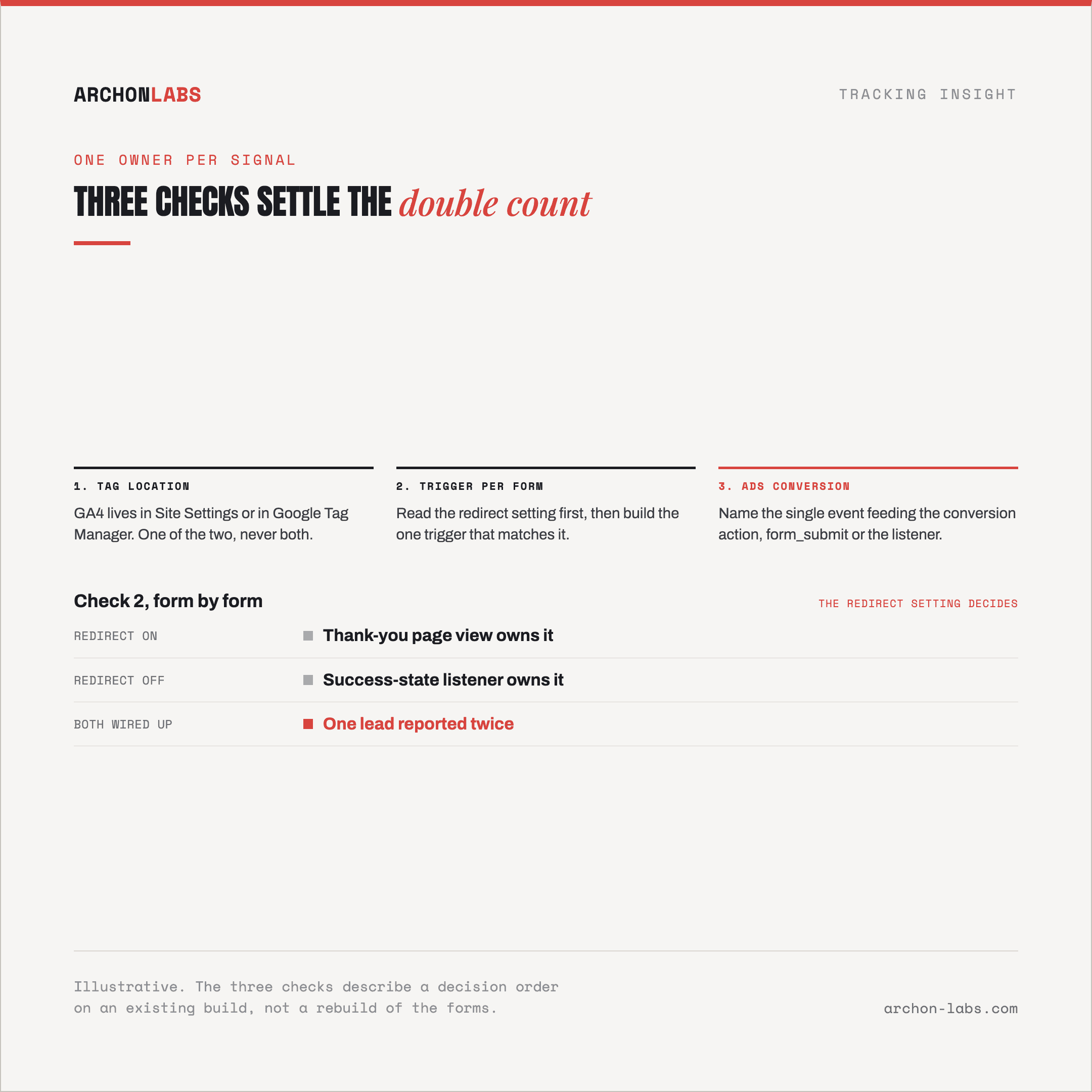
The third cause is the redirect option itself. A conversion setup built the classic way, a trigger keyed to a visitor reaching a specific thank-you URL, only fires on a Webflow form where that redirect has actually been turned on. On an inherited site that is rarely all-or-nothing, a previous developer often enabled the redirect for one high-value form and left every other form on its default inline state. Where a URL-based trigger and a success-state listener are both wired up at once, whichever forms have the redirect switched on report the submission twice, once as a page view on arrival and once from the listener that already caught the inline success state moments earlier.
What good looks like
None of these three causes needs a rebuild, each needs one clear decision about which single signal owns a given form, made deliberately rather than left to whatever a previous developer happened to configure. Start with Site Settings, confirm the GA4 tag lives in exactly one place, never both the native integration and a separately installed Google Tag Manager container. Then, form by form, confirm whether the redirect is on or off, and build exactly one conversion trigger to match it, either the redirect's page view or a success-state listener, never both for the same form. Where GA4's automatic form_submit event is also marked as a key event, decide whether it or the custom listener owns the Google Ads conversion, not both feeding the same conversion action.
An inherited Webflow site, stitched together by more than one developer over time, is exactly where this kind of quiet duplication builds up unnoticed. Archon Signal is built to map every sender touching a conversion event across a client's stack and settle which one should own it, so a lead gets counted once, the way the client actually reads the report.
FAQ
Does Webflow's native Google Analytics integration conflict with Google Tag Manager?
It can, if both are configured to send GA4 data at the same time. Webflow's own setup guide recommends keeping the GA4 tag in only one place, either the native Site Settings integration or a separately installed script such as Google Tag Manager, never both at once.
How do we check whether a Webflow form is double counting a submission?
Submit a real test form and watch GA4's DebugView or the browser's network requests during that session. Two separate hits carrying a form-related event for one submission, or a GA4 conversion count that runs consistently ahead of Webflow's own form submissions list for the same date range, both point at the same problem.
Should GA4's automatic form_submit event be turned off?
Not automatically, it depends on whether anything else is already watching the same submission. If a Google Tag Manager listener covers a form and reports it as a key event or a Google Ads conversion, leaving enhanced measurement's form_submit marked as a key event too is what causes the double count, not the event's existence on its own.
Does turning on a thank-you page redirect fix the double count?
Only if every trigger watching that form is rebuilt to match it. A redirect changes the form from an inline success state to a page visitors actually land on, so a success-state listener built for the old behaviour keeps firing right alongside the new page view trigger unless it is removed or repointed.
Is this only a Google Ads problem, or does it show up in GA4 too?
Both. The extra event lands in GA4 first, either as a duplicate hit from two active GA4 tags or as a second event type for the same submission. From there it reaches Google Ads only if that duplicated event or key event is the one feeding the conversion action, so a client report can already look inflated in GA4 before Google Ads conversions are even checked.
If Webflow's own form numbers and Google Ads or GA4 don't agree, request a free tracking audit and we will map out which signal should own each conversion.