The symptom
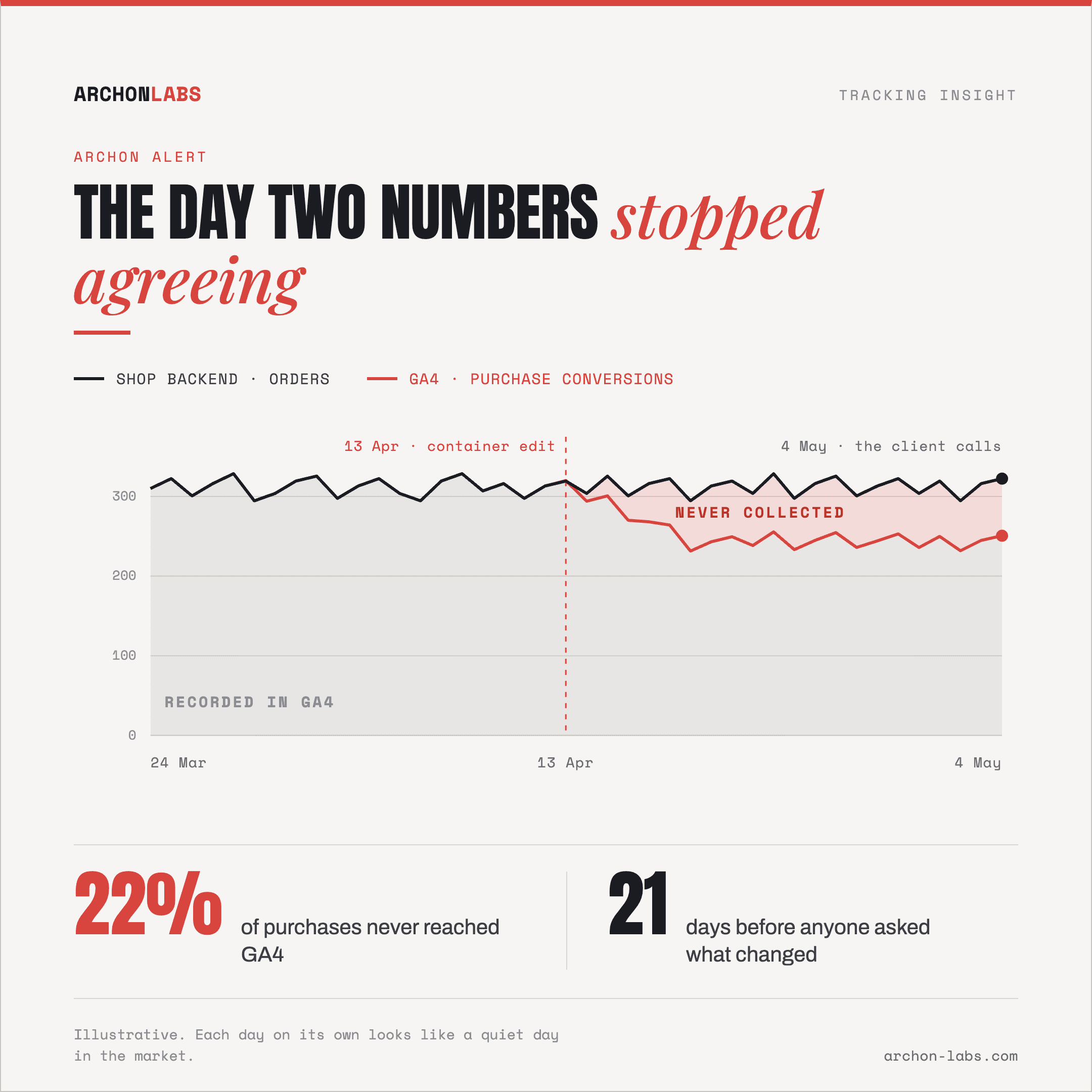
The call comes in on a Monday. The client was in their own dashboard over the weekend, their conversions look low, and they want to know what changed. You open GA4 while they are on the line and they are right. Now you are diagnosing in public.
The question that hurts is when it started. A tracking break rarely announces itself on the day it happens. It shows up as a slightly soft week, then another one, and each day on its own looks like a quiet day in the market. By the time the shape is obvious in a report, the gap is weeks wide.
Nobody missed a warning. There was no warning to miss.
Why it happens
A break produces a smaller number, not an error
Software that fails loudly is easy to operate. Tracking does not fail loudly. A tag stops firing, a consent default flips to denied, a container edit lands, a route changes, and everything downstream keeps working correctly on whatever it still receives. Reports render, totals add up, nothing turns red anywhere.
What you are being asked to notice is an absence, and an absence has no signature. A conversion that was never sent produces no zero, no gap and no warning. It appears as a number lower than it should have been, next to no record of what it should have been.
Nobody has a reference point, so ordinary variation hides it
Ask what a healthy Tuesday looks like for a specific client and channel and the honest answer is a range, not a figure. Traffic moves with campaigns, seasons and promotions, so this week against last week compares two samples of a moving thing. A genuine loss inside that range survives the morning check.
The starting point is not even neutral. Around 15-30% of conversions go consistently uncaptured on a normal setup with nothing broken, so an agency's instinct for normal is already calibrated below reality. A fresh break lands on top of that, inside the same tolerance, and looks like more of the same.
The platforms do have alarms, and they are slower than the client
GA4's standard reports are not a monitoring system, and the defaults are not what most teams assume. Google Analytics Help states that many reports and explorations can take 24-48 hours to process data. The one near-live view, the Realtime report, covers the last 30 minutes and is documented as a way to verify that the measurement code is working, not as a way to watch an account overnight.
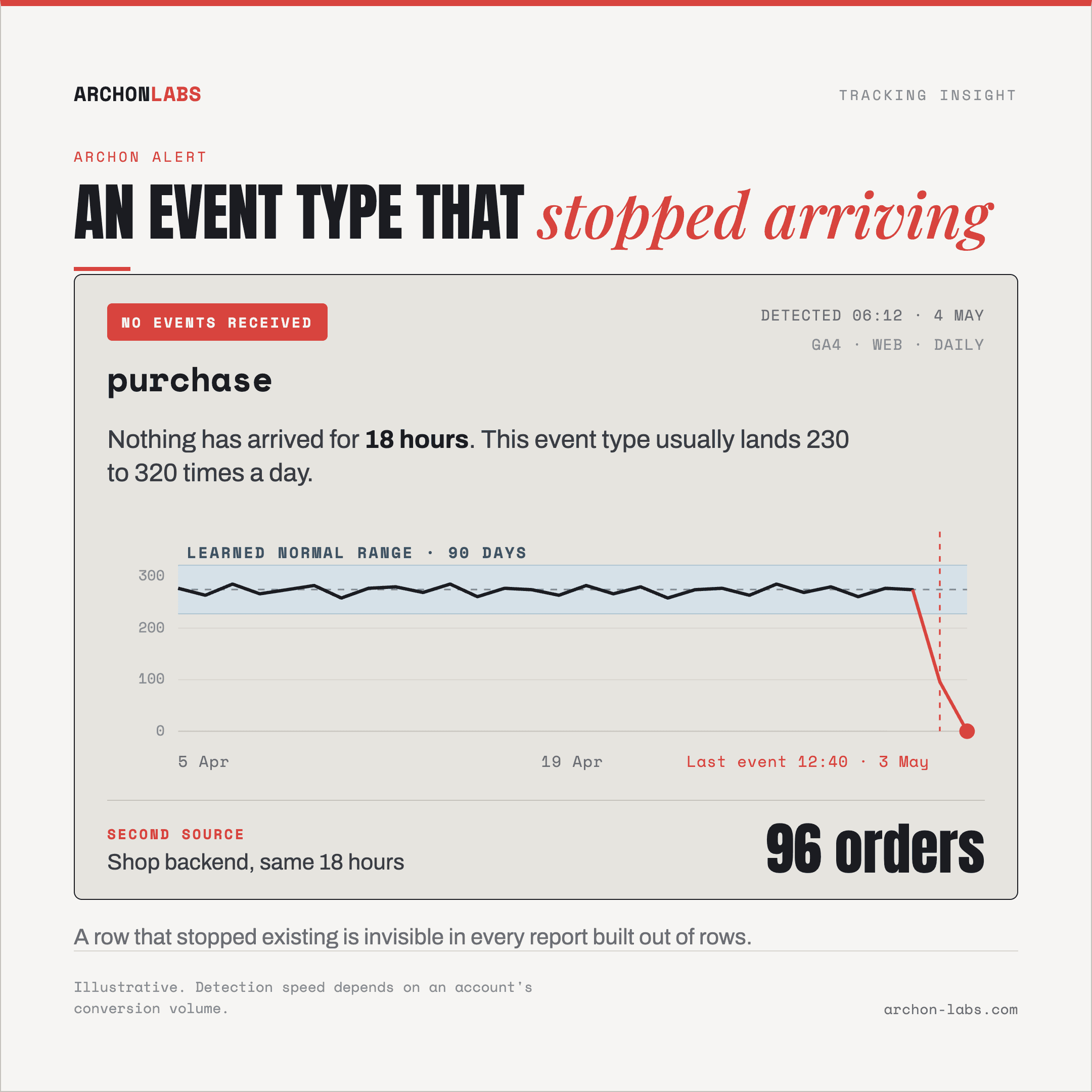
GA4 does have real anomaly detection built into Insights, and Google describes the method: a Bayesian state space time series model, with a 90-day training period for daily anomalies and 32 weeks for weekly ones. Serious statistics, with one structural limit. It can only find anomalies in data GA4 received. An event type that stopped arriving is not an unusual value, it is an empty set, and an empty set is not anomalous.
Google Ads is more direct. In Google's documentation of conversion action statuses, an action reads "No recent conversions" when Google has seen the tag but recorded no conversions in the last 7 days, and "Tag inactive" when Google no longer sees the tag either. So a platform alarm exists, it is a week wide, and it fires on an action that went to zero. One that quietly lost part of its volume keeps its healthy status throughout.
Your reporting rhythm sets your worst case
If an account gets a proper review once a month, a month is the ceiling on how late you can be. The client is not on your rhythm. They look at their shop backend, their CRM and their bank account, none of which depend on a tag firing. Their detection window is shorter than yours by design.
By the time you find out, the past is already settled
Detection speed is not a hygiene concern, it converts directly into data you never get back. Fixing the cause repairs collection going forward, nothing more. Google is blunt about the limit in its documentation on modifying events: modified and new events do not apply to historical data. Events that were never collected are not waiting to be reprocessed once the tag works again.
Even the window for re-examining the damaged period is finite. Google Analytics Help puts event-level retention on standard properties at 2 or 14 months, with data deleted automatically at the end of that period. Meanwhile the numbers keep getting used, in optimization decisions and in the client's report. Every week of latency is a permanent thin patch in the dataset that client will later use for modeling, or for feeding an AI tool that cannot know one month is not to be trusted.
What good looks like
You cannot detect a break, you can only detect a difference, so something has to hold the reference point a dashboard does not. In practice, three jobs running quietly per client account.
A learned normal range per metric, not a fixed line. The comparison has to move with the metric, so an alert means the value left its own range rather than crossed a threshold typed in a year ago.
An explicit watch for absence. Something has to ask which event types arrived today that arrived yesterday. A row that stopped existing is invisible in every report built out of rows.
A second, independent source. GA4 compared against GA4 cannot reveal loss GA4 never knew about. Measured conversions checked against the shop backend, the CRM or the ad platform is what turns a shortfall into something you can see.
Archon Alert does those three across an agency's portfolio: it learns each client's baseline, watches for metrics and event types that stopped behaving like themselves, and tells your team before a client's report does. Be exact about what that buys. It shortens the distance between a break happening and a human knowing. It does not prevent breaks, and it cannot bring back what was already missed.
What counts as fast enough depends on the account, not on a policy. A high-volume ecommerce client produces enough events that a real drop separates from noise inside a day. A lead generation client with a few conversions a week does not, and running it at ecommerce sensitivity produces alerts nobody reads, which is its own way of failing. Releases are a common trigger, so a deploy is a moment to watch closely.
FAQ
Can we not just check the dashboards every morning?
Morning checks catch outages and miss erosion. Without a stated expectation for the metric, somebody looking at a chart is comparing it against memory, and memory is tolerant. The check is also late by construction, since Google puts standard report processing at 24-48 hours.
Does GA4's built-in anomaly detection not cover this?
It covers part of it and it beats nothing. Two gaps matter for an agency. It reasons about data GA4 received, so it cannot flag events that never arrived, and it has no view of the shop backend or CRM, so it cannot see a shortfall that only appears when two sources are compared. Its training windows matter too: a newly added event has to accumulate history first.
How quickly should we expect to find out?
It depends on conversion volume, and anyone quoting one number for every account is guessing. High-volume accounts can realistically be caught the same day, because a day is a large enough sample for a drop to stand out. Low-volume lead generation needs longer before a dip can be told apart from a quiet stretch. The target is being reliably ahead of the client's own reporting rhythm.
If we catch it in a day, do we get the missing conversions back?
Not from the platform that missed them. Collection resumes, the gap stays a gap, and Google states plainly that modified and new events do not apply to historical data. Whether anything can be re-sent depends on whether another system recorded those conversions and on what the receiving platform accepts, which is case by case. Catching it in a day instead of a month keeps the hole small.
Who should own the monitoring, us or the client's developers?
Developers own the code that changed, but they are the wrong people to rely on for noticing measurement drift, because it is not visible from where they work. The agency owns the numbers it reports on, so monitoring sits on the agency's side.
If you are not sure how you would currently find out, that uncertainty is the finding. A free tracking audit maps where each client account is losing data today, and how long it would take you to notice if it got worse.