The symptom
Google Ads and GA4 purchase counts drop, sometimes to zero, and the store is still selling. Shopify's own order count says the day was normal. When only one platform goes quiet the fix is usually obvious, a broken tag, a paused campaign. When both go quiet on the same store at the same time, the usual playbook, check the Google Tag Manager preview, republish the container, ask the client if anything changed on the site, comes up empty.
Tag Assistant makes it worse before it makes it better. Open it on the confirmation page and it reports no tags at all, not broken tags, none. An agency that has debugged GTM for years reads that as "the container isn't loading" and starts rebuilding a setup that was never actually broken.
This is not the familiar GA4-versus-Shopify number mismatch, where two systems count the same orders differently. This is an outage on one specific page, and it lines up with a date Shopify has been publishing for a year: non-Plus stores had until August 26, 2026 to move off the old Thank you and Order status pages.
Why it happens
The page the tag lived on changed underneath it
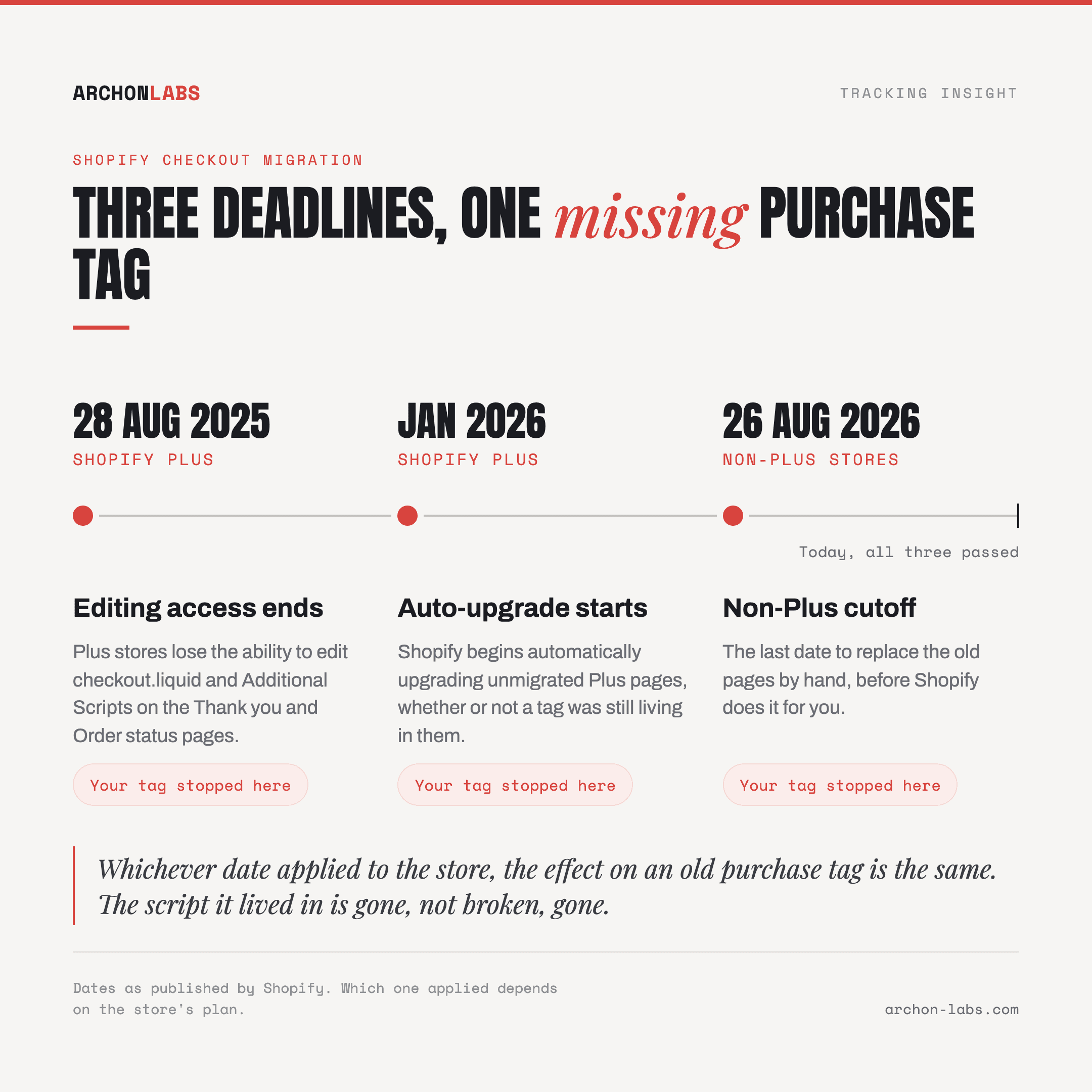
Shopify has been retiring checkout.liquid, Additional Scripts and script tags on the Thank you and Order status pages. Plus stores lost the ability to edit them after August 28, 2025, and Shopify began automatically upgrading unmigrated Plus pages in January 2026. Non-Plus stores had a longer runway, until August 26, 2026, to replace them by hand before Shopify did it for them. Whichever version applied to a given store, the effect on an old purchase tag is the same: the script it lived in is gone, not broken, gone.
The replacement runs in a sandbox, not on the page
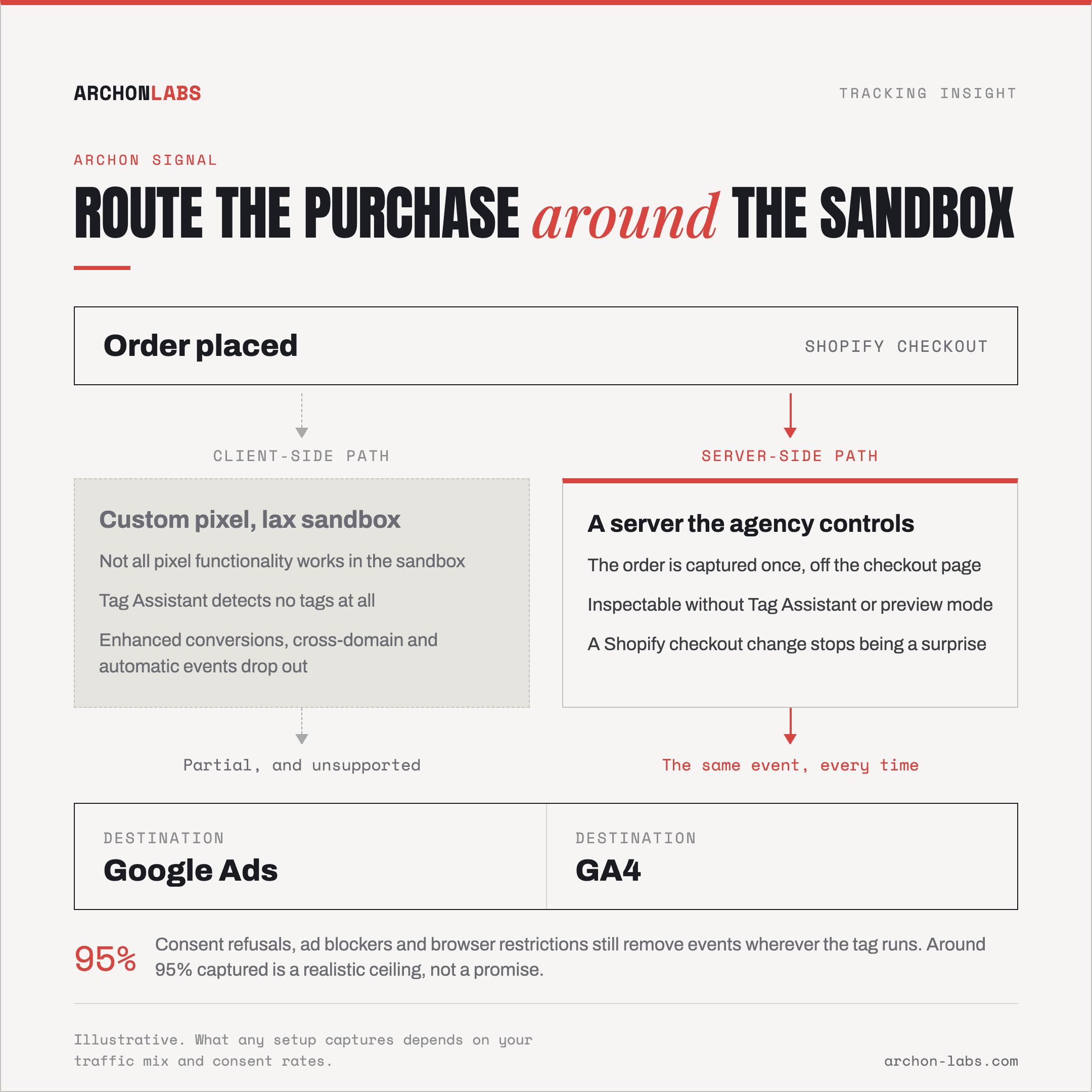
Shopify's own replacement for tracking on these pages is a pixel, and a custom pixel specifically runs inside what Shopify calls a "lax sandbox," built, in Shopify's words, "for improved security and control over the data that you send to third parties." Shopify says plainly that "not all pixel functionality works in the sandbox," and that "adding and using custom pixels is unsupported by Shopify." A tag that expects normal page access, the kind Google Tag Manager was built around, is running somewhere designed specifically not to give it that.
Tag Assistant is not lying, it genuinely cannot see in
This is the part that costs agencies the most time, because the debugging tool everyone reaches for first does not work here. Shopify's own tutorial for putting GTM inside a custom pixel states it directly: "Google Tag Assistant's Troubleshoot tag feature isn't compatible with custom pixels, and doesn't detect any Google tags in a custom pixel, or other pixels being loaded by GTM." Shopify's suggested substitute is its own Shopify Pixel Helper, not Tag Assistant, and not GTM's preview mode either. Google's side of the documentation agrees and goes further: inside a custom pixel, "some events and parameters that depend on signals from outside the sandbox may be lost," and features including enhanced conversions, phone call conversions, cross-domain measurement and GA4's automatic event detection don't function inside it. Google's own conclusion is blunt: this is an unsupported setup, and "Google support won't be able to help you fix these issues."
Two senders can end up pointed at one purchase
Google's documented fix for all of this is to stop using a custom pixel for sitewide measurement and install the Google & YouTube channel app instead, which Google calls "the recommended method for setting up Google tagging on Shopify." That app installs its own Google Ads and GA4 tagging automatically, including on the order confirmation. A store that adds the app but leaves an existing custom pixel targeting the same conversion action now has two independent senders reporting one sale, the generic fault documented in why Google Ads counts the same conversion twice, just triggered here by a Shopify migration instead of a leftover tag from a previous agency.
What good looks like
Every fix Shopify and Google publish here assumes the purchase event stays inside whatever the sandbox allows this quarter, whichever channel app is current, or whatever debugging workaround replaces Tag Assistant next. None of that changes the underlying fragility: the highest-value event in the funnel now fires from the most locked-down, least inspectable page on the site.
Archon Signal moves the purchase event server-side instead of leaving it dependent on what a client-side sandbox does or does not expose. The order is captured once, from a server the agency controls, so a Shopify checkout architecture change stops being a surprise nobody notices until the client asks about the drop in the monthly call. It makes the setup more resilient, and it still does not close every gap: consent refusals, ad blockers and browser restrictions keep removing some share of events regardless of where the tag runs, and the realistic ceiling on what any setup captures is roughly 95%, a ceiling rather than a promise.
FAQ
Did Shopify remove Google Tag Manager support?
Not entirely, but it removed the page GTM used to run on unmodified. GTM can still be loaded inside a custom pixel, but Shopify calls that an unsupported implementation, and the sandbox it runs in blocks parts of what a normal GTM container relies on.
Why does Tag Assistant show nothing at all on our confirmation page?
Because it is built to inspect the page's own contents, and a custom pixel runs isolated from it. Shopify states this directly: Tag Assistant's troubleshoot feature does not detect tags inside a custom pixel. Use the Shopify Pixel Helper to confirm events are firing instead.
Should we just switch to the Google & YouTube channel app?
It is Google's own recommended path for sitewide Shopify tagging, and it is simpler than maintaining a custom pixel. Check first whether anything else, a custom pixel, an older tag, is still targeting the same conversion action, or the store ends up with two senders for one sale.
We're on Shopify Plus. Does this affect us too?
The Plus deadline already passed: editing access to the old additional scripts and checkout.liquid ended August 28, 2025, and Shopify began automatically upgrading unmigrated Plus pages in January 2026. If a Plus store's purchase tracking has been quietly off since the turn of the year, this is almost certainly why.
How do we confirm purchases are actually firing again?
Place a real test order, then check the Shopify Pixel Helper on the confirmation page rather than Tag Assistant or GTM preview, neither of which reaches inside the sandbox. Confirm the event separately in Google Ads and GA4's realtime reports before trusting the daily totals again.
If a client's Shopify account has gone quiet on one platform while orders keep arriving, that is exactly what the free tracking audit is built to trace.