The symptom
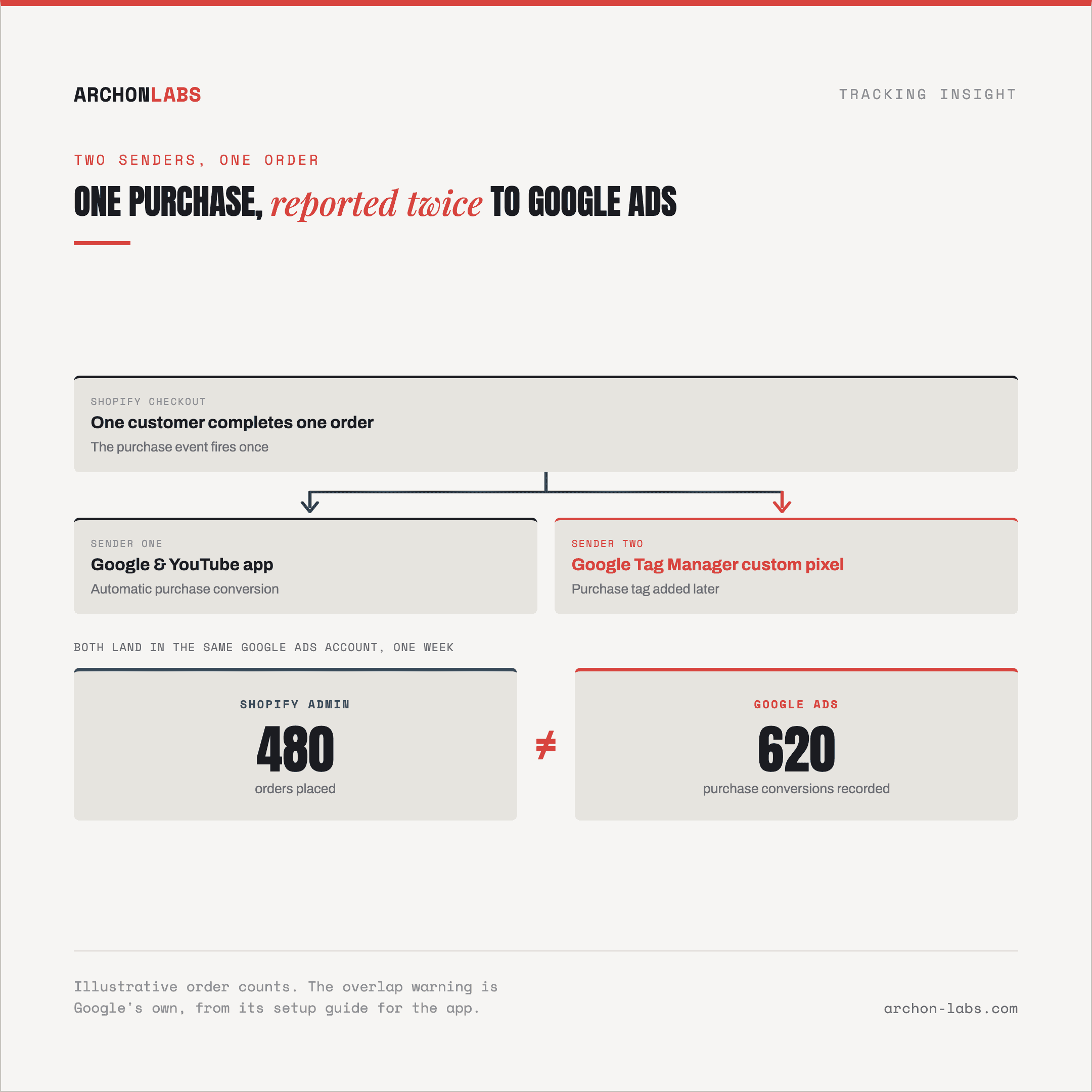
A Shopify store's Google Ads conversions run higher than the order count in Shopify admin, and nobody remembers changing anything recently. Somewhere in the store's history, someone installed the Google & YouTube app to get conversion tracking running, and separately, an earlier developer or a different agency, added a Google Tag Manager container as a custom pixel to handle everything else Google Ads was not covering. Both are still live. Both still fire on the same purchase.
Neither addition was wrong on its own. The app is Google's own recommended starting point for Shopify conversion tracking, and Google Tag Manager is the standard way to send data anywhere beyond Google. The fault is not either tool, it is that nobody decided which one owns the purchase event once both existed, and Shopify does not stop two pixels from reporting the same order.
Why it happens
The Google & YouTube app is Google's own answer to Shopify conversion tracking. Google's own setup guide calls it "the easiest way to set up conversion tracking" on the platform: install it, link a Google Ads account, and purchase, add-to-cart and checkout-started map to conversion actions without a line of code. For a store sending data to Google Ads and nowhere else, that is close to the entire job done.
A Google Tag Manager container reaches Shopify a different way. Shopify's own tutorial for the setup adds it as a custom pixel, and states plainly that "adding and using custom pixels is unsupported by Shopify", running in a looser sandbox than an app pixel per Shopify's own pixel documentation. That flexibility is exactly why agencies reach for it in the first place: one container can fan the same event out to Meta, LinkedIn, a data layer, or a server-side endpoint, jobs the Google & YouTube app was never built to do, since it only talks to Google.
Nothing on Shopify stops both from being installed at once, and nothing stops both from targeting the same conversion. Google's own setup guide for the app names the exact failure mode: it instructs agencies to check "if you have conversions in the Google & YouTube app and in the storefront or custom pixel", and to remove the legacy tag once the app is the source of truth. That sentence exists because Google has seen this collision often enough to warn against it by name, inside its own documentation for the app.
The mechanism from there is the same one behind every duplicate conversion in a Google Ads account: two senders reporting the same purchase, with nothing telling the platform they are the same order. Google Ads deduplicates repeat conversions inside a single conversion action when they carry the same transaction ID, it does not reconcile two different senders unless one of them is switched off. A store running the app and a Google Tag Manager pixel that both fire the purchase event has exactly that setup, whether or not either side ever intended to duplicate anything.
The two options also share a limit that neither fixes for the other. Both are browser-executed pixels, so both sit behind the same 30-40% of events that ad blockers and browser restrictions strip out before either one runs. Picking the right sender solves double counting. It does not solve the separate, larger problem of events that never reach either pixel at all.
What good looks like
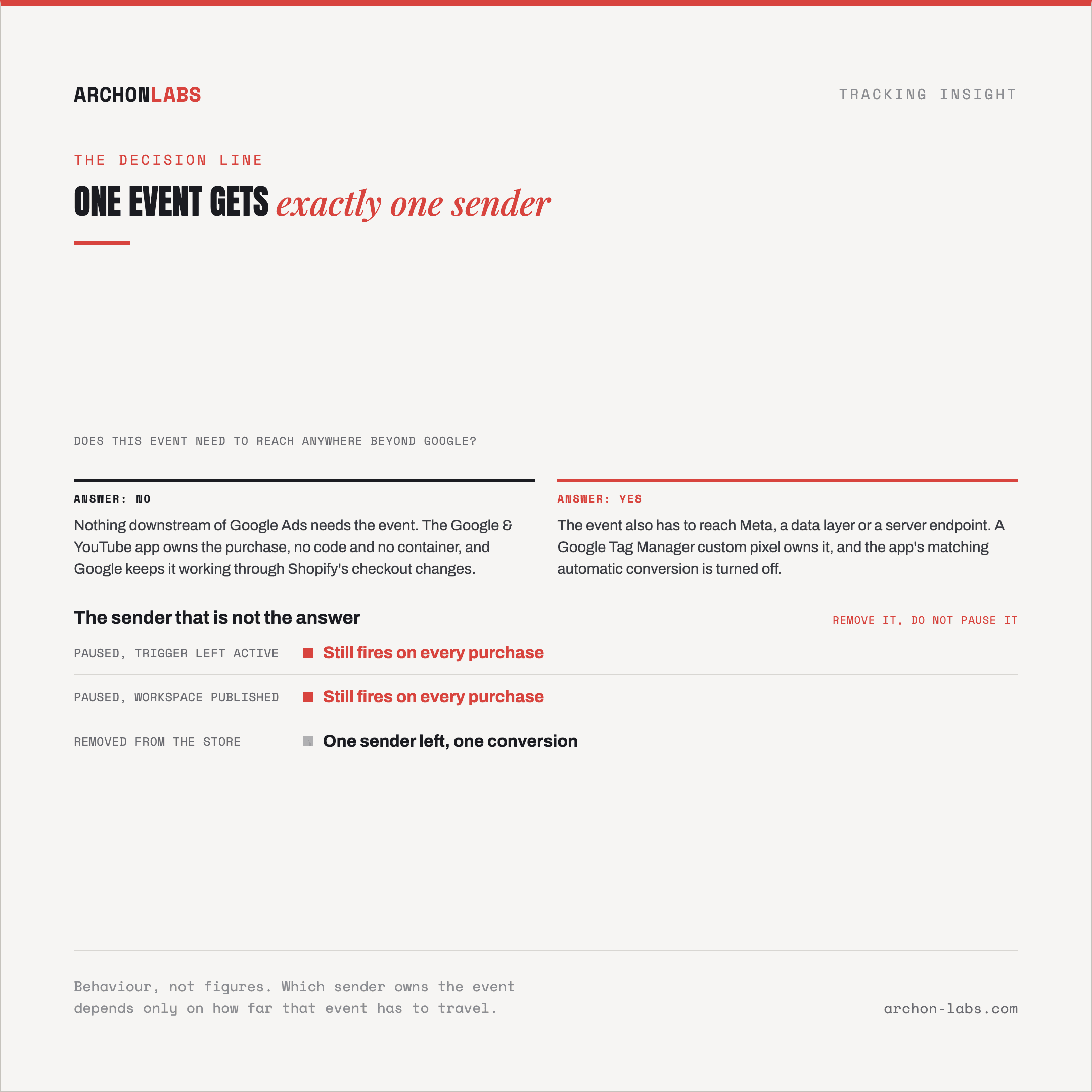
The rule is not which tool is better, it is that one event needs exactly one sender. For a store whose conversions only need to reach Google Ads and YouTube, the Google & YouTube app is the right default, no code, and Google keeps it working against Shopify's own checkout changes. Reach for a Google Tag Manager custom pixel instead once the store needs to send the same event to a platform beyond Google, fire a custom tag the app does not support, or feed a data layer another tool reads from. Once that decision is made, whichever option is not the answer gets removed, not paused, since a paused tag with a workspace still published or a trigger left active can still fire.
Where an inherited store already runs both and nobody can say which one is authoritative, that is the check to run before touching bidding or budget. Archon Signal is built for exactly this: working out which sender should own each event on a Shopify store, removing the one that does not earn its place, and configuring what is left so a purchase reaches Google Ads once.
FAQ
How do we tell if both are actually firing on the same event?
Compare the conversion actions each one feeds inside Google Ads. If the app's automatic purchase action and a Google Tag Manager fed action both show volume that tracks the store's order count, both are live on the same event. Google's Tag Assistant will not help here, it does not detect tags running inside a custom pixel.
Should we remove the Google Tag Manager pixel or the app?
Keep whichever one does the job the store actually needs. If nothing downstream of Google Ads needs the event, for example an audience sync or a separate platform's conversions API, the app alone is enough and Google Tag Manager is the one to remove. If something does need it, keep Google Tag Manager and let it own the conversion action the app would otherwise duplicate.
Does moving to a Google Tag Manager server container fix this instead?
It moves where the tag executes, it does not decide which sender owns the event. The never-both rule holds either way: a server container replacing the client-side pixel still needs the app's matching automatic tracking turned off for that conversion, or the collision just moves server-side.
We only use the Google & YouTube app. Do we still need to check anything?
Check for leftover tags from before the app was installed. A hardcoded snippet in old theme code or Additional Scripts, or a Google Tag Manager container from a previous developer that nobody removed, causes the same duplication even though it was never meant to be the primary sender.
Does fixing this change our reported ROAS or CPA?
Usually it moves them down, since a duplicated purchase inflates the conversion count both feed into. Raise it with the client before making the change, with the corrected order count from Shopify admin as the reference point, rather than letting the number move first and explaining it after.
If an inherited Shopify store is running more tracking than anyone can account for, request a free tracking audit and we will map out which sender should own each event.