The symptom
You open the traffic acquisition report to build the monthly channel breakdown, and there it is. A row called (not set), sitting between Organic Search and Paid Social, holding a share of sessions too big to ignore and too vague to explain.
The client's question lands four minutes later. Which channel is that? The honest answer is that GA4 does not know either. Those sessions were real, some of them converted, and there is no record of where they came from. At Archon Labs it is one of the first things we check, because it is usually the visible edge of something larger.
The row also keeps moving. Last month it was in landing page, this month in session source / medium. Someone finds a checklist, changes a Google Tag Manager trigger, and the row does not budge. That is not bad luck, it is what happens when four different problems share one label.

Why it happens
Start with what the value means, because it is narrower than most people assume. Per Google's Analytics Help documentation, "(not set) is a placeholder name that Analytics uses when it hasn't received any information for a dimension", and the reasons it appears vary by dimension. So it is not a bug with a fix, it is an empty field. Which field is empty tells you the cause, and a fix aimed at the wrong one cannot work however well it is built.
Source and medium: the session never announced itself
Google is specific here. Session source / medium "will report (not set) for sessions where the automatically collected event session_start is missing". Attribution hangs off the start of the session, so a session that began without that event has nothing to attribute.
That happens more often than it sounds. Google's own tagging guidance warns that late configuration commands cause inaccurate reporting and affect user and session identity, and that the tag must be initialised before any event methods are called. It also happens server-side. The Measurement Protocol documentation notes that creating a new session_id "creates a new session without the need to send session_start", so a server-side setup can produce sessions that by design have no start event and no source.
That also explains a second row on the same report. Google states that when session source / medium is (not set), the traffic "will be shown as Unassigned in the default channel group". Two rows, the same sessions.
Landing page: the session had no page view
Shorter cause, same logic. Google: "(not set) can appear for the landing page dimension when a session doesn't have a page_view event." Single-page applications, measurement that fires before the page view is recorded, and server-side events sent without page context all produce sessions that were real and pages that were never registered.
Google Ads: the click identifier did not survive the trip
For the Google Ads dimensions, Google lists two administrative causes and one technical one. The administrative ones are quick to check: the Ads account and the property are not linked, or auto-tagging is not enabled.
The technical one is more interesting. Auto-tagging appends a click identifier called gclid to the ad's destination URL, per Google Ads Help, and it has to arrive intact. Google's own warning: "If your website uses redirects, it's also important to make sure the GCLID is passed to the final landing page in order to track conversions." Google also notes that a small share of sites reject arbitrary URL parameters outright and serve an error page when auto-tagging is on.
The same mechanism, different parameter, applies across domains. Cross-domain measurement passes cookie IDs between domains in a _gl URL parameter, and Google says that a destination page that redirects or rejects query parameters "may end up" stripping it. Get that wrong and, in Google's words, one person visiting two root domains becomes "two users and two sessions instead of one user and one session", the second sourced from wherever it seems to come from.
Manual campaign tagging fails the same way, and Google names it: destination URLs with incomplete or incorrect UTM parameters produce (not set). A team hand-building links across five platforms will eventually produce incomplete ones.
The three values that look like (not set) and are not
This is where diagnoses go wrong.
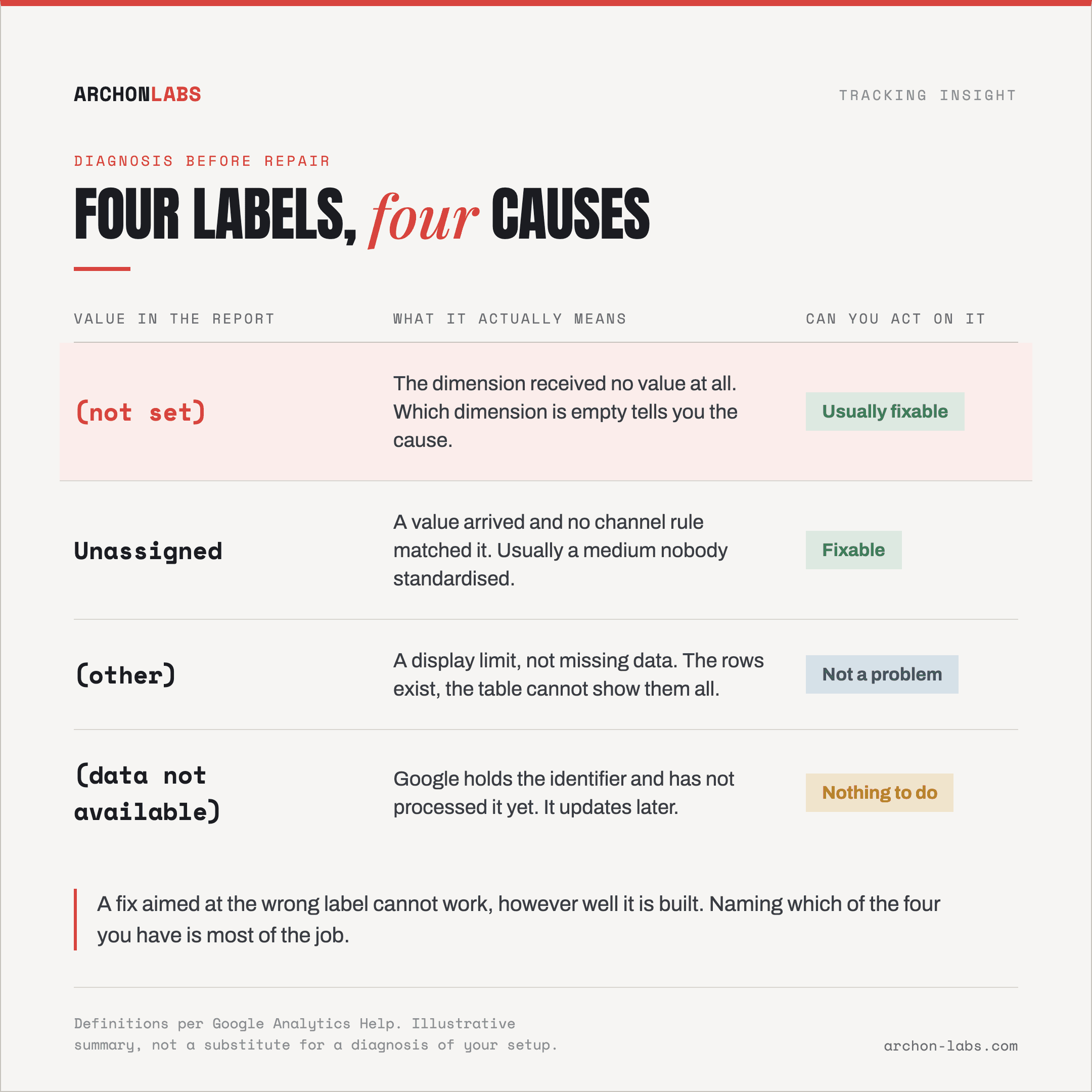
Unassigned means the value arrived and no channel rule matched it. Google: "Unassigned is the value Analytics uses when there are no other channel rules that match the event data." Usually a campaign medium nobody standardised.
(other) is not missing data at all, it is a display limit. GA4 has a cardinality limit of 50,000 values, treats any dimension with more than 500 unique values in a day as high cardinality, and condenses rows past a table's row limit into (other). The data exists, the table cannot show it.
(data not available) means Google received the identifier and has not processed it yet. Per Analytics Help, users generally cannot take action to reduce it, unlike (not set) values, where corrective actions are often possible.
Four labels, four causes, one of which you cannot act on and one of which is not a problem. Working out which you have is most of the job.
What good looks like
Diagnosis before repair. Before anyone touches a tag, name the dimension that is empty and check whether the share is stable or moving. A steady share is a structural gap in how sessions start. A share that jumped last Tuesday is a release. Different problems, different people.
Then fix identity where it is set, not where it is displayed. Almost every source-level cause above is one problem in different clothes: the session's identity was not established before measurement began, or it was established and lost in transit. Google's own advice points the same way, a consistent cookie prefix across the site and measurement flowing through the server tag.
This is where a first-party measurement layer earns its place. Archon Pixel collects from your client's own domain, so session identity is established once, first-party, instead of depending on a parameter surviving a redirect chain. It captures +25% more than standard GA4 on the same traffic, and gives you a second dataset to hold GA4 against, which is how you tell a real attribution gap from a reporting artefact. What it does not do is make (not set) vanish. Roughly 95% of events is the realistic ceiling on any setup, and treating a ceiling as a promise is how agencies get caught out.
Last, report the residue instead of hiding it. An unattributed share you have named and sized is a credible report. The same share quietly redistributed across named channels is why clients stop trusting the numbers. The baseline here is that 15-30% of conversions go consistently uncaptured, so an unattributable slice is not an embarrassment, it is the part of the job most agencies never make visible. If conversion counts are short too, that is a separate question about events that never reach GA4 at all. And when two platforms disagree on a channel, an unattributed share is often why every tool shows a different number.
FAQ
How much (not set) traffic is acceptable?
Google publishes no threshold, and anyone quoting one is guessing. Two things are checkable instead: which dimension is empty, and whether the share is stable week over week. A steady share points at how sessions are started, a sudden jump at something that shipped.
Is (not set) the same as direct traffic?
No, and conflating them hides the problem. Direct is a channel GA4 assigns when it sees no referrer and no campaign parameters. (not set) means the dimension holds no value at all. When source / medium is (not set), Google says those sessions surface as Unassigned, not Direct.
Will moving to server-side tracking fix it?
It depends, on one thing: whether session identity is handled properly on the way. Server-side collection removes the causes that live in the browser and can introduce new ones, because the Measurement Protocol can start a session without a session_start event, and such sessions have no source to report. Done carefully it reduces (not set). Done as a lift and shift it can increase it.
Can the missing attribution be recovered afterwards?
Generally not. Google separates the cases: (data not available) is data it holds but has not processed, and gets updated later, while (not set) usually does not. One exception before you raise an alarm, a newly registered custom parameter legitimately reads (not set) for its first 24 hours.
If a (not set) row is sitting in a report you have to defend this month, a free tracking audit will tell you which dimension is empty and why, before the client asks.