The symptom
Somewhere in the last few months, someone on the account ticked "collect automatically detected user-provided data" in the Google tag, or the equivalent box in Google Tag Manager, or turned on Meta's Automatic Advanced Matching in Events Manager. The promise on the tin is simple: better match rates, better bidding, almost no setup work. So it got switched on, the diagnostics report showed a match rate, and everyone moved on to the next client.
Nobody went back to check what the tag was actually picking up off the page. Nobody re-opened the setting after a redesign added a new footer, a new contact block, or a chat widget with a pre-filled support address. It keeps running quietly in the background, and because it never throws a visible error, there is no obvious moment to notice it scanning the wrong thing, or that it stopped being able to send anything at all the week the cookie banner changed.
Both failure modes are invisible from inside the platform. One looks like a healthy match rate that is quietly built on the same handful of accounts. The other looks like nothing happening, for a slice of traffic nobody thought to check.
Why it happens
Automatic collection is one setting with the same shape in three places. In Google Ads and Google Tag Manager it is the automatic method for enhanced conversions: the tag inspects the page for strings matching configured data types, meaning email addresses, phone numbers, and name or address fields, and hashes whatever it finds. Meta's Automatic Advanced Matching does the same job for the pixel: it detects email, first name and last name fields on the page and hashes them in the visitor's browser before sending. Same idea, same mechanism, two platforms.
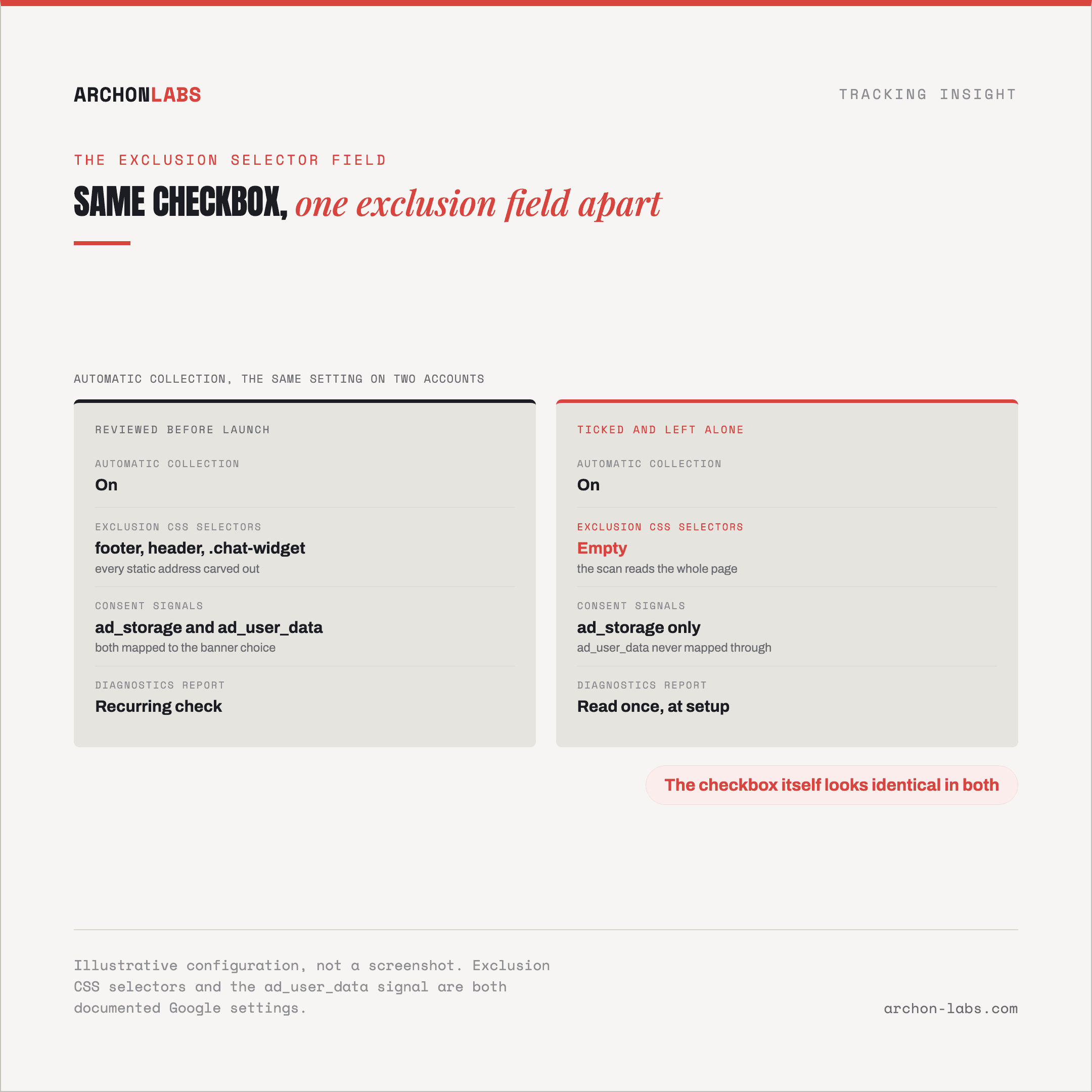
The word doing the damage in both descriptions is page, not form. The tag does not know which field the customer actually filled in, it scans whatever is rendered. That is exactly why both setups ship with a way to carve out parts of the page, Google calls it exclusion CSS selectors, a feature that only makes sense if the scan is not scoped by default. Two specific ways that turns into a real problem.
Failure mode one: no consent, no data, and nobody notices
Enhanced conversions is gated on a specific consent signal, and it is not the one most teams assume. Google's own documentation on consent signals states that ad_user_data "sets consent for sending user data to Google for online advertising purposes," and lists hashed first-party data for enhanced conversions as one of the categories disabled outright when that signal is denied. That is a separate switch from ad_storage, which only governs the ads cookie itself, and the Google tag's own setup page for automatic collection mentions ad_storage, not ad_user_data. That is exactly where the gap opens: a site can have its banner correctly wired to ad_storage and still never send a single hashed value for consent-denied visitors, or in the opposite failure, send it before the banner has recorded a choice at all, if the two signals were never mapped through the same consent management platform. We walked through wiring this correctly in consent mode v2 without throwing data away. Either way, the checkbox in the tag looks identical whether it is working or not.
Failure mode two: one address, read as one customer
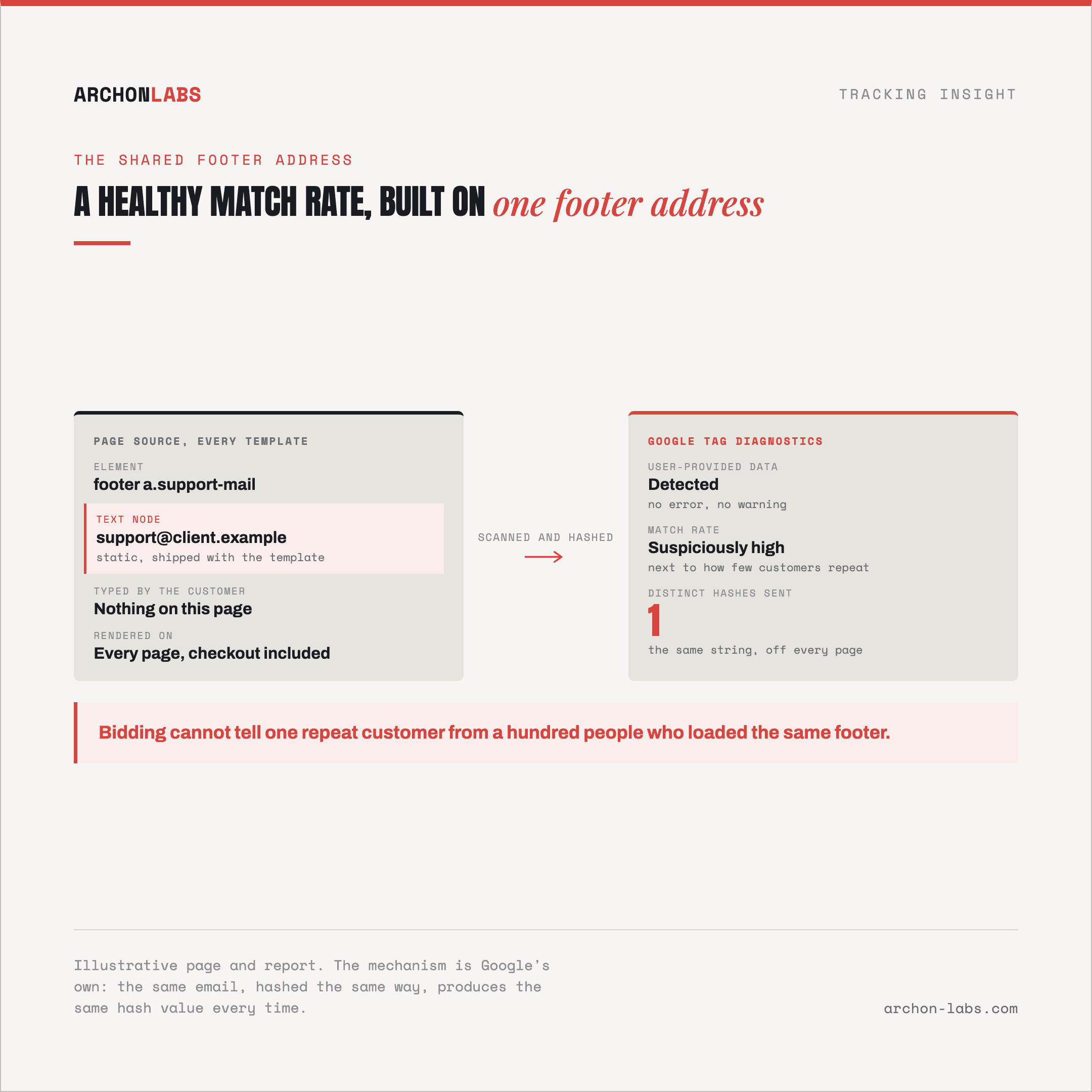
The second failure needs no consent problem at all, only a page with a static, sitewide contact detail somewhere in its markup. A support email in the footer, a phone number in the header, an account manager's address on a widget that loads on every page. If the scan picks that up instead of the field the customer actually typed, it hashes the same string every time.
That matters because of what the hash is for. Google's own explanation of the feature states the matching works "because the same person's email, hashed the same way, produces the same hash value every time," and a match against Google's own hashed account data is what ties a conversion to a person. The mechanism has no way to tell a genuinely repeat customer from a hundred different people who all happened to load a page carrying the same shared address. Each conversion that picks it up arrives at the bidding algorithm looking like the same customer converting again and again, which quietly distorts whatever value-based bidding is optimizing toward.
What good looks like
Turning the checkbox on is not the finish line, it is where the review should start. Before automatic collection goes live on a client account, open the page and find every element that could match an email, phone or name pattern, then add exclusions for anything static or shared before the tag ever fires on real traffic. Confirm both consent signals, ad_storage and ad_user_data, are actually wired through the consent management platform to the same banner choice, rather than assumed because one of them was set up months ago for a different feature. Then treat the tag diagnostics report as a recurring check, not a one-time step at setup.
This is the exact gap Archon Consent exists to close: consent signals mapped correctly into what the tags actually send, checked against what a client's page is really presenting rather than what the setup was assumed to be doing. Getting this right does not push any setup past the honest ceiling on what a browser will ever let through, roughly 95% of events at best, but it is the difference between a setup that quietly works and one that quietly feeds the bidding algorithm the wrong customer.
Frequently asked questions
Should we just turn off automatic collection and use manual data instead?
Not necessarily. Manual collection, pointing the tag at specific fields on the checkout or lead form, avoids the footer problem entirely, but it takes development time on every template that carries a conversion event. Automatic collection is fine once someone has actually reviewed what it scans and excluded what it should not touch.
Does this affect Meta the same way as Google Ads?
The mechanism is the same shape: page-wide field detection, hashed in the browser, matched against the platform's own data, so both failure modes apply in principle. Meta's version carries its own specific limits around iframes and regulated verticals that go beyond what this article covers.
How would we even know if this has already been happening?
Start with the tag diagnostics report and look for a match rate that seems high relative to how few customers actually convert repeatedly. Then check the page itself for any static email, phone number or address sitting outside the actual conversion form. Both checks take minutes once someone knows to look.
Does automatic collection ever run without any consent at all?
It should not, if ad_user_data is correctly wired to the same banner as everything else. The risk is not that Google or Meta ignore consent, it is that a site's own consent management platform never actually connects that specific signal, so the tag behaves as if consent were always granted or always denied, and nobody notices which.
Is this only a problem for lead-generation sites?
No. Ecommerce checkout pages carry the same risk wherever a support contact, a live chat prefill, or an account manager's details sit in a template shared across every page on the site, not only in a footer.
If you want to know what your own tags are actually collecting before it shows up as a strange number in a client report, request a free tracking audit.