The symptom
A client account gets the proper build. Server-side container, first-party cookies, a clean GA4 property, conversions firing where they should. Everyone signs it off and moves on to the next account.
Six months later that account is doing what it did in week one. It counts form submissions and purchases and sends them to Google Ads and Meta. Meanwhile the client's CRM knows which of those leads became customers and what each one was worth, and the warehouse has been collecting events since the day it was switched on. None of that goes back into the platforms that decide where the budget goes. Nobody switched those things off, either. They were never switched on, and there is no record of the decision, because it was never a decision.
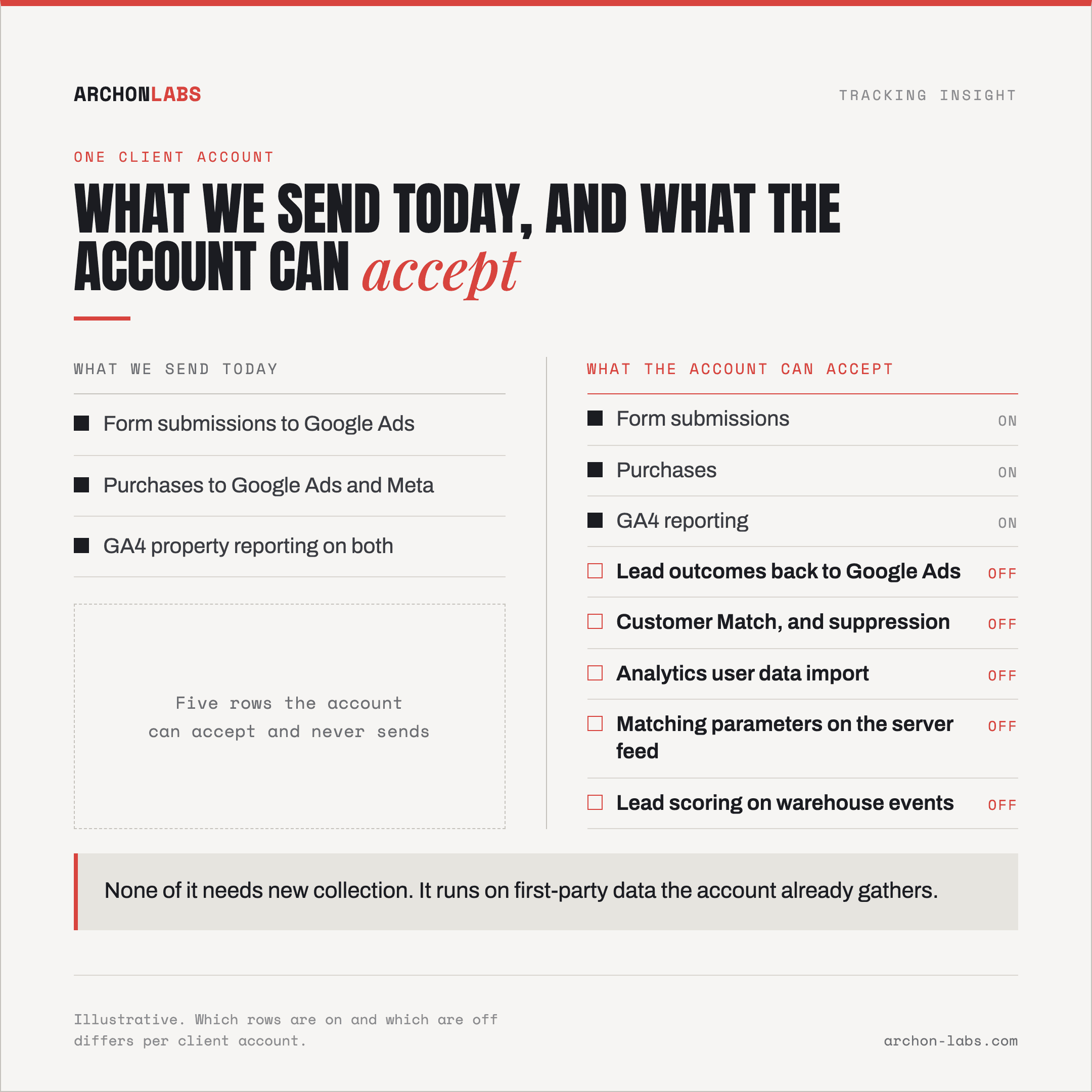
"Half" in the title is a figure of speech, not a measurement. We are not going to put a percentage on your account, because the spread between clients is enormous and the only honest way to answer it is to look. What can be named is what usually sits unused.
Why does so much of it sit unused?
Because building a tracking setup and using one are two different jobs, and only the first has a deadline.
"Working" is where the project ends
A setup is signed off when data flows and the numbers roughly reconcile. That is a fair definition, and also where the conversation stops. Nobody writes the second page, the one that says what this account is now capable of and in what order to switch it on. Without it the capability stays invisible.
Nothing complains about a feature that is off
A tag that breaks announces itself: conversions drop, somebody notices on a Monday, it gets fixed. A feature that was never enabled produces no error and no gap in a chart, because the chart only ever plotted what you were already sending. That is how the unused layer survives a QA pass, a handover and a new hire.
The options changed after your setup was built
The first-party features moved recently. Enhanced conversions for leads needs at least one of an email address, a phone number or an address, and the Google Click ID is only required, per Google Ads Help, "if you are not implementing a tag to collect user-provided data". In June 2026 Google merged enhanced conversions for web and leads into one feature with a single on/off switch and moved those uploads to its Data Manager API, per Google's note on the change. A setup built eighteen months ago was built against a different menu.
What is usually sitting there switched off
Roughly in order:
Lead outcomes going back to Google Ads. Offline conversion import stores the click ID Google issues for each ad click next to the lead record and hands it back when that lead becomes a customer. Enhanced conversions for leads does the same job with hashed customer data, which Google Ads Help describes as what attributes the conversion back to the campaign. Either route lets bidding optimise toward leads that closed rather than forms that submitted, and mechanics are in getting offline conversions back into the ad platforms.
Customer Match, for exclusion as much as targeting. It reaches customers from a file of contact details they gave the client, across Search, the Shopping tab, Gmail, YouTube and Display, per Google Ads Help. Accounts that have it rarely use it to suppress existing customers, the version that stops paid budget buying people the client already has.
Analytics data import. GA4 supports five types, per Google's Analytics documentation: campaign cost data from non-Google networks, item data, user data, offline events, and custom event data. The one that sits unused most often is user data, which Google describes as "user metadata, for example, a loyalty rating or lifetime customer value".
The matching parameters on a server-side feed. A Conversions API connection can be live and still be under-matched. Meta deduplicates a browser event against a server event when the event ID and event name line up, or the event name plus the browser ID, and only within 48 hours of the first event carrying that ID, per Meta's Conversions API documentation. Switched on is not switched on properly, which is the subject of why enhanced conversions and CAPI under-deliver.
Scoring, once the events live in a warehouse. When raw events and CRM outcomes sit in one place, a lead score is a query rather than a product. Most setups hold the ingredients and nobody has written the query.
None of them needs new collection. They run on first-party data the account already gathers, which is why they are cheap to switch on and easy to forget.
What good looks like
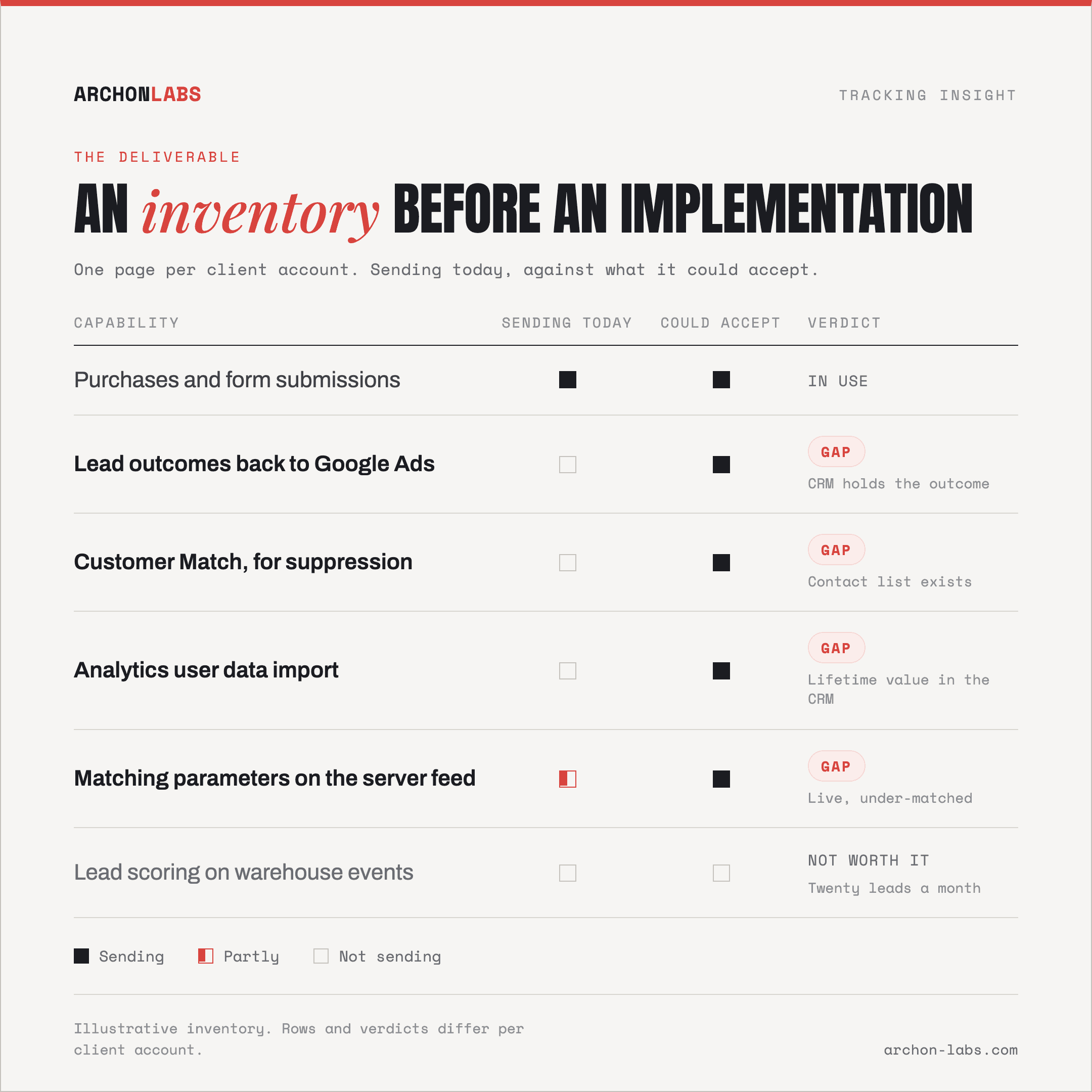
An inventory before an implementation. One page per client, two columns: what each platform receives today, and what it could accept given the data this client already holds. Boring document, and it is the whole deliverable, because it turns "are we using this properly" into a list with owners and reasons.
Then order matters, and most agencies take it backwards. Fix collection before building on top of it. On a standard client-side setup 15-30% of conversions go uncaptured, and importing lead outcomes on top of a feed with that hole in it optimises bidding toward a biased sample. Collection first, then the return path, then the audience work, then scoring.
That order is why Archon Pixel tends to be the piece we build first: a first-party measurement layer that captures around 25% more than a standard GA4 setup and lands raw events in the client's own BigQuery. Everything above it then reads from something reliable, and the CRM outcome and the ad click sit in one place, which makes scoring a query rather than a project.
Be honest about the edges, because each row has one. Customer Match lists have a maximum membership duration of 540 days, and a list needs at least 100 members added or updated inside that window to stay eligible, per Google Ads Help, so a low-volume client can build a segment that quietly stops working. Importing lead outcomes is only as good as the CRM stage that triggers it, so a pipeline nobody updates consistently will send noise with confidence. Lead scoring on twenty leads a month is astrology. And none of it arrives at completeness: consent refusals, blockers and network failure keep a share of events out of any setup, roughly 95% being a ceiling rather than a promise.
FAQ
How do we find out what is actually switched on?
Per account, and by reading the platforms rather than asking the team. Which conversion actions exist and which of them are imported, whether user-provided data is being collected, whether any audience list is fed from client data, whether anything is imported into the analytics property.
Is this not just finding features to bill the client for?
It would be, if the inventory came back as a shopping list. Both columns get written precisely so most rows can end in "not worth it for this client", with a reason next to them. A two-week sales cycle and no repeat purchase does not need lead scoring. The rows that survive are the ones where the data already exists and the platform is already asking for it.
Our client's sales cycle runs for months. Does importing outcomes still work?
It depends, and it is worth checking per account rather than assuming. Import windows and reporting lookbacks are set by each platform and differ between them, so a deal that closes long after the click can fall outside what the platform accepts. The hashed-data route removes the need to carry a click ID around for months, and it does not remove the platform's own limits.
Do we need consent for any of this?
Yes. Uploading data about people in the EEA requires the consent signals to be passed to Google alongside it, per Google Ads Help, and the same logic governs anything built on customer records. Treat the consent basis as a column in the inventory, not a step afterwards, because a feature that works and should not have been enabled is worse than one that was never switched on.
Can we do any of it without a warehouse?
Partly. Returning lead outcomes and Customer Match run off a CRM export. Scoring, joining spend to revenue, and anything needing event history past the analytics retention window do need one, because the join has to happen somewhere you control.
If you want to know which of these your accounts could already carry, a free tracking audit inventories one client account: what it sends today, what it could send, and which rows are worth the work.