The symptom
An agency wants one more thing out of Shopify tracking: which banner a shopper actually saw before checkout, how far down a product page they scrolled, or whether a specific customer field is available to a marketing tool. The answer that comes back from whoever built the pixel is some version of "the pixel can't see that," and it rarely satisfies anyone, because the storefront visibly has that information. The banner rendered. The scroll happened. The field exists somewhere in Shopify's own system. The pixel is simply not allowed to read it.
The confusion is reasonable. A Shopify pixel looks like a script sitting on the page, the way a Google Ads tag or a Meta pixel does elsewhere on the web. It is not. It runs inside a sandbox Shopify built to keep it away from the page, the store's other scripts, and, for one of the two pixel types, the store's own address. What a pixel reports back is not a matter of writing it better. It is a fixed list, set by Shopify, and knowing that list changes what an agency can honestly promise a client.
Why it happens
A pixel runs next to the page, not on it
Every pixel on a Shopify store, whether it comes from an installed app or is written by hand, is routed through the same system now. Shopify's own documentation on pixels states that pixels "run on your online store, customer accounts pages, or store checkout," and there is no supported route left for tracking code placed directly in theme files. That one sentence is the whole shift: tracking stopped being part of the page and became a guest the page lets in on specific terms.
Two sandbox tiers, two different ceilings
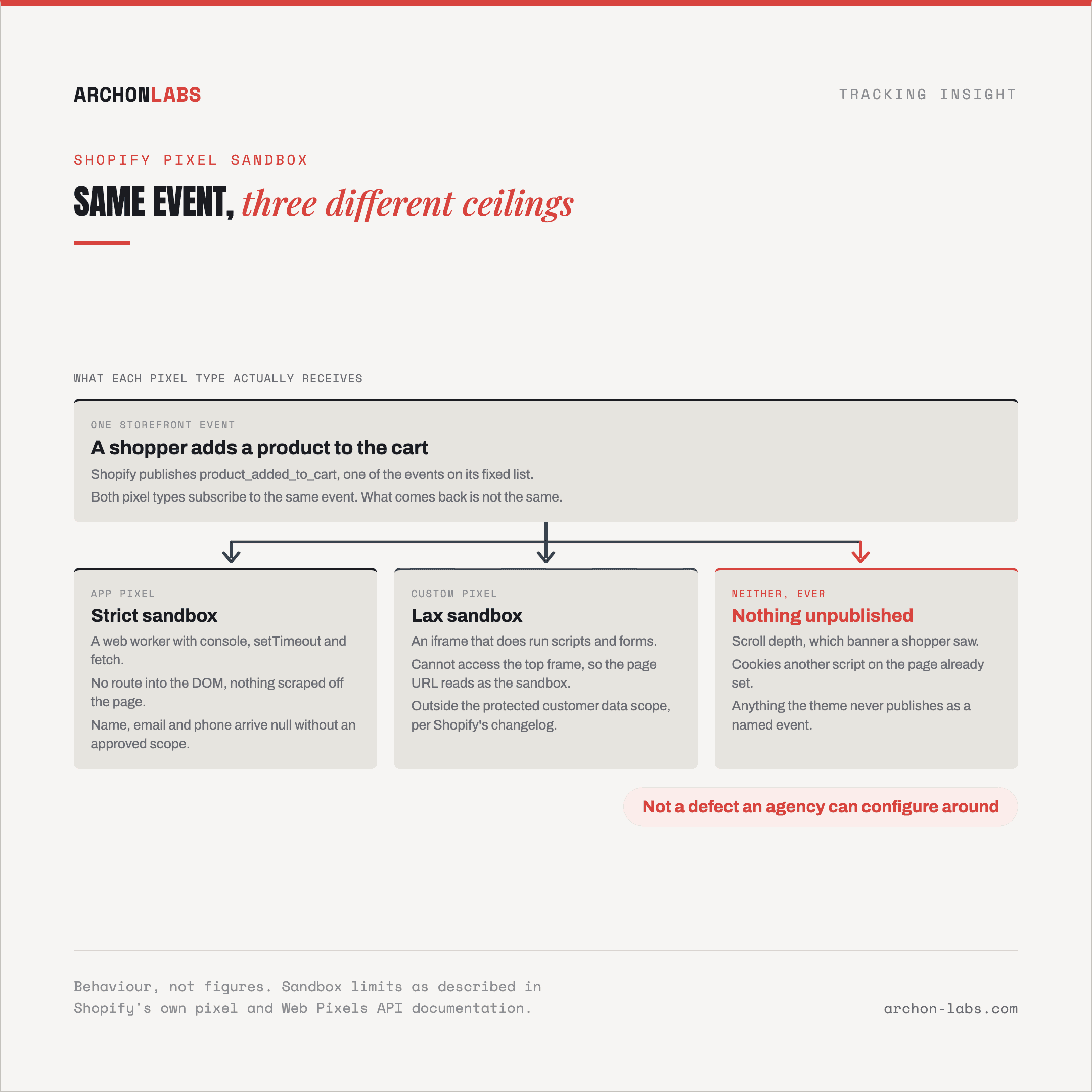
Shopify runs pixels in one of two sandboxes, and which one a pixel gets is fixed by how it was installed, not chosen by whoever configures it. An app pixel, installed through the App Store, runs in what Shopify's developer documentation calls a strict sandbox, a web worker that, in Shopify's own words, guarantees only the presence of a small set of globals, including "console, setTimeout" and fetch, with no route into the page's DOM at all. Shopify states plainly that "any features that rely on scraping the DOM for information or attempting to write to the DOM" will not work the same, or will not work at all, inside it. A custom pixel, written by hand and added directly in the pixel settings, runs in a looser lax sandbox instead, loaded as an iframe that does allow scripts and forms to execute. That sounds like more room, and inside the iframe it is, but the same documentation notes that a pixel placed there "cannot access the top frame," so a call to read the page's own address returns the sandbox's internal URL, not the store's real one. Neither sandbox gives a pixel the standing on the page that a plain script tag once had.
The event list is fixed, it is not the page
A pixel does not watch the page and decide what looks interesting. It subscribes to a defined set of events that Shopify's own system publishes: page views, product and collection views, search, cart changes, and each step of checkout through to a completed order. Shopify's Web Pixels API reference lists this set explicitly, and a pixel can only act on an event that is on it, or on a custom event a store's own theme or checkout extension chooses to publish itself. There is no general watch-everything mode sitting underneath it. If a behavior was never turned into one of these named events, no pixel, either sandbox, app or custom, can report it, because nothing is being published for it to subscribe to.
Consent is a gate, not a filter
Every pixel declares which categories of visitor permission it needs, drawn from a fixed set: analytics, marketing, preferences and sale of data. Shopify's own documentation is explicit about what happens when one of those is missing: the pixel manager "will only load your pixel if there is visitor permission for all of the settings that your pixel declares as required." That is a gate on whether the pixel runs at all, not a filter that quietly strips a few fields while everything else still arrives. A pixel that declares marketing consent as required does not fire in some reduced or anonymized form for a visitor who declined it. It does not fire.
The customer object is redacted by design
Even once a pixel is running and permitted, the customer fields it receives are not automatically the real ones. Since December 10, 2025, Shopify enforces protected customer data scopes on pixels: an app pixel that has not been approved for a given scope receives a null value for the matching field, name, email, phone or address, enforced, in Shopify's own words, "on all web pixel surfaces: storefront, checkout, and customer accounts." The same changelog entry states that "custom pixels are out of scope for this change," which sits oddly next to everything above it: the sandbox that gives a custom pixel more room to run is also the one this particular scope system does not gate the same way. Two pixels sitting side by side on the same store can end up holding a different customer object for the same visitor.
What good looks like
None of this is a defect an agency can configure around. A sandbox that blocks DOM access does not start allowing it because the pixel is well written, and an event Shopify never publishes does not appear because someone asks harder. The realistic move is to stop treating the sandbox as an obstacle to route past, and build the measurement plan around what it actually exposes, plus whatever the store's own server can confirm independently of any pixel.
Archon Pixel is built for that split. It works from the standard and custom events Shopify's system actually publishes rather than assuming a workaround exists for the ones it does not, and pairs that with server-confirmed events for the one place, the completed order, where a pixel is not the only path to the truth. That still does not add up to everything. Ad blockers and browser restrictions remove a further 30-40% of events before a pixel of any kind gets the chance to run at all, and the honest ceiling across a Shopify setup like this sits at roughly 95%, a ceiling, not a promise.

FAQ
Can a custom pixel read cookies another script on the site already set?
Not directly. A custom pixel runs inside its own iframe and, per Shopify's documentation, cannot access the top frame, so it cannot reach into the page's own cookie jar the way a script loaded directly on the page normally would. Its own browser object can set and read cookies, but that is scoped to the pixel's own sandbox, not a way into whatever another script already stored.
If our theme needs a specific customer interaction tracked, can a pixel just watch for it?
Only if that interaction is already one of Shopify's standard events, or the theme or checkout extension explicitly publishes it as a custom event. A pixel subscribes to what is published, it does not scan the page for activity, so an interaction nobody turned into a named event stays invisible to every pixel on the store, regardless of sandbox type.
Does an app pixel or a custom pixel get more of the customer's real data?
It depends which restriction is in play. App pixels are gated by protected customer data scopes, so an unapproved app receives null fields even though it sits in the stricter sandbox. Custom pixels sit outside that particular scope system by Shopify's own changelog, but they are still bound by whatever consent categories the pixel declares, and by the sandbox's own limit on reaching the real page.
Does moving the purchase event server-side get around the sandbox entirely?
For that one event, largely yes, because a server-confirmed order does not depend on a pixel running in either sandbox at all. It does not extend to earlier events in the funnel. Browsing, cart and checkout-step data still depend on a pixel bound by the same fixed event list and consent gate described above, so moving the purchase event server-side closes one specific gap, not the sandbox itself.
If an agency needs to know exactly what a Shopify setup can and cannot measure before making a promise to a client about it, that is what a free tracking audit is built to answer.