The symptom
Automatic advanced matching got switched on in Events Manager at some point, probably during the original pixel setup, and nobody has looked at it since. Match rate for the ad account sits somewhere in the middle of the range Meta shows, and whether that number moved because of the setting or in spite of it is not something anyone on the account can actually answer.
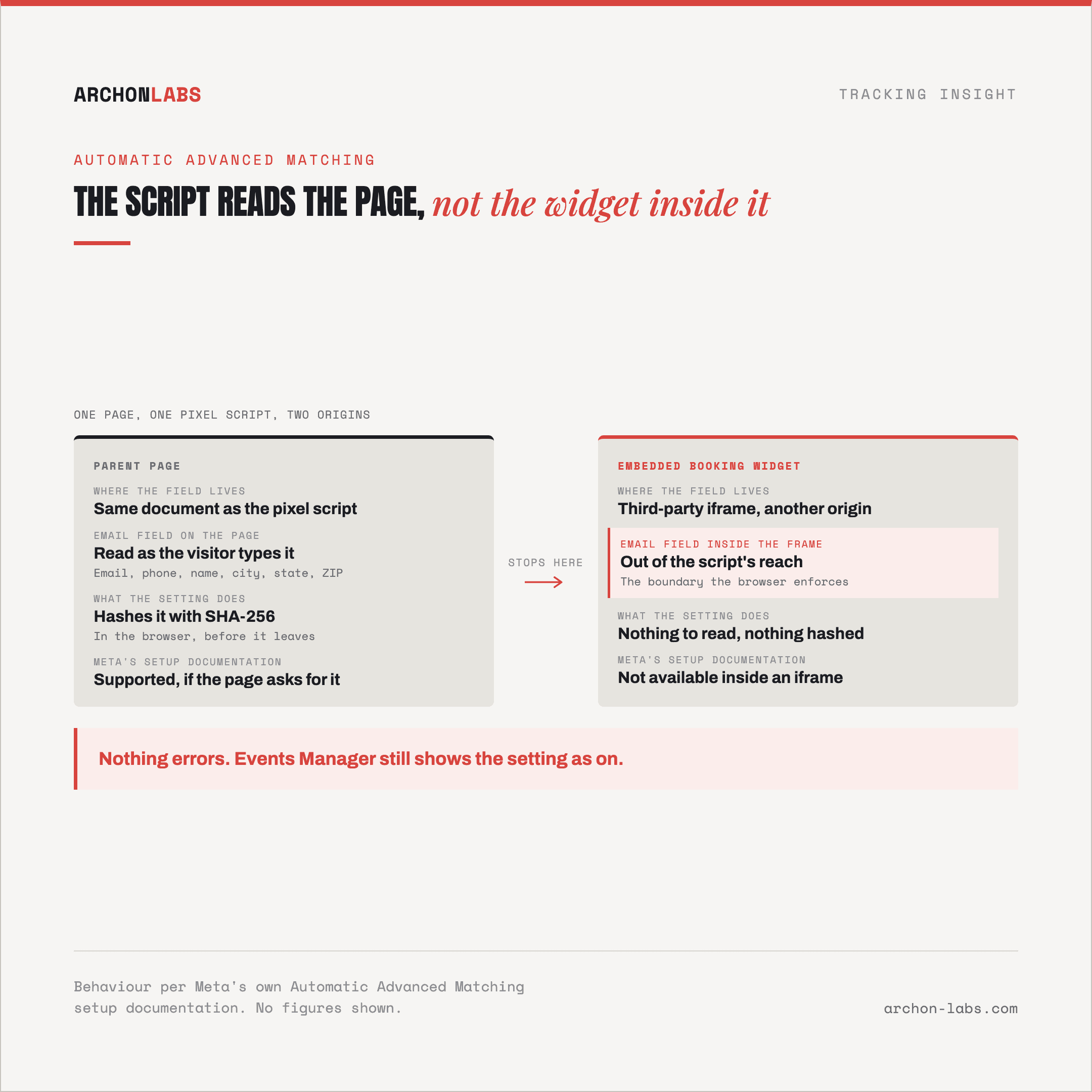
Then a client's checkout gets rebuilt into an embedded widget, or a lead form moves into a third-party booking tool loaded in an iframe, and match rate does not visibly change in either direction. Nothing throws an error. Nothing in Events Manager flags it. The setting still shows as on. Whether it is contributing anything on that particular page is a different question, and it is not one the interface answers for you.
Why it happens
Automatic advanced matching (AAM) works by having Meta's pixel script look at the current page for on-page form fields holding recognisable customer information, email, phone, first and last name, city, state, country, ZIP code, and hashing whatever it finds with SHA-256 before it leaves the browser, the same client-side hashing Meta's own developer documentation describes for advanced matching generally. The setup requirement Meta states directly is that the site has to actually contain form fields asking for that information. No form, no fields the script recognises, nothing for the setting to do, regardless of whether it is switched on.
Where Meta rules it out completely
Meta's own setup documentation for Automatic Advanced Matching states two hard exclusions: it is not available for IMG Pixels, and it is not available for a pixel set up in an iframe. Manual advanced matching, which sends the hashed customer parameters explicitly rather than relying on the pixel script reading the page, is Meta's own stated alternative for both. A checkout widget, booking tool, or lead form loaded inside an iframe, a common pattern for third-party embeds, gets nothing from AAM no matter how well the form inside it is built. Separately, and this is a general browser fact rather than Meta's own stated reason, a cross-origin iframe is exactly the kind of boundary the browser's own same-origin policy exists to enforce, restricting a page's script from reading into a frame it does not share an origin with. The same setup page also states that businesses in a regulated vertical, Meta's own classification, are not permitted to use Automatic Advanced Matching at all, whatever the pixel setup looks like.
It reacts to an action, not to identity
Meta's own best-practices guidance for advanced matching is direct about this: automatic advanced matching does not know who a visitor is unless they take an action on that page, filling in a form or logging in during that visit. A returning, already-signed-in visitor who does not touch a form contributes nothing through AAM on that page load, even though the business clearly knows who they are. Meta's own recommendation for sites where visitors stay signed in for long stretches is to use manual advanced matching instead, since it sends the hashed values whenever the pixel fires, independent of whether anyone logged in during that particular visit.
One further consequence follows from how the detection works rather than from anything Meta documents directly: AAM can only hash a value it can read as the real field value at the moment someone interacts with it. A field whose visible content is not the true customer data, because a payment or verification widget has already masked or tokenised it before the pixel script runs, or because the value only becomes real further down a multi-step form, gives AAM either nothing, or a value that hashes to something that will never match a customer record on Meta's side. That is a reasoned consequence of the mechanism above, not a documented Meta claim, and it is the kind of gap that looks identical to a working setup from inside Events Manager.
What good looks like
Turning AAM on is still the right default for an ordinary site with plain, native form fields and a pixel that is not embedded in an iframe. What changes the picture is checking, per client, whether any of the three documented exclusions apply: an iframe or IMG pixel anywhere the pixel needs to fire, a regulated vertical, or a page where visitors are typically already signed in and rarely re-enter their details. Where one does, manual advanced matching is Meta's own stated fix, and it is exactly the kind of consent and identity wiring Archon Consent builds as part of a client's setup, verified once rather than assumed from the toggle being on. A sudden, unexplained shift in Meta's reported conversions is often this same category of problem from the other direction, covered in Meta conversions dropped suddenly, what happened?, where lost match parameters is one of the causes worth ruling out first.

FAQ
Does turning on automatic advanced matching mean Meta is reading every field on our forms?
No. It only reads values it can see as native form field content, on a page where the pixel itself is not inside an iframe or an IMG pixel. A form built so the real value is not what is in the field at the moment of interaction gives it nothing usable, and nothing in Events Manager flags that as a problem.
If our checkout is embedded in an iframe, is there any way to get advanced matching working there?
Yes. Meta's own documentation names manual advanced matching as the alternative for exactly this case. It sends the hashed customer parameters explicitly rather than depending on the pixel script reading the page, so the iframe boundary does not affect it the same way.
We run a financial services site. Can we use automatic advanced matching at all?
Meta's own setup documentation excludes regulated verticals from Automatic Advanced Matching entirely, not just in specific configurations. Manual advanced matching remains available.
Our visitors usually stay logged in for weeks. Is automatic advanced matching still doing anything for them?
Not much, according to Meta's own guidance. It only recognises a visitor through an on-page action during that visit, not through an existing session. Meta's own recommendation for sites like this is manual advanced matching instead.
How would we even notice this is happening, since nothing throws an error?
You mostly wouldn't, from inside Events Manager alone. It takes deliberately checking each of the documented exclusions, iframe or IMG pixel, regulated vertical, mostly-logged-in traffic, against the actual pages the pixel fires on, rather than trusting that the setting being switched on means it is contributing everywhere.
If you are not sure whether automatic advanced matching is actually reaching your forms, a free tracking audit checks it page by page.